The E-Learning Curve Blog has moved!

You will be automatically redirected to the new address in 10 seconds. If that does not occur for some reason, visit
http://michaelhanley.ie/elearningcurve/
and update your bookmarks.

Showing posts with label Freemind. Show all posts

Tuesday, May 6, 2008

Open Environment E-learning 6: Microsoft Producer

Microsoft Producer for Microsoft Office PowerPoint 2003, the current version of this popular add-on for Microsoft PowerPoint, is a freely available application that facilitates the capture, synchronisation, and publishing of audio, video, slides, and images. The primary reasons for choosing this application for content integration were it’s low learning curve for non-media experts, as well as it’s facility to export SCORM metadata as part of the final output package.

Other features include the familiar Microsoft Office interface provided, as well as the ability to import Microsoft formats including Visio files, Windows Video and Windows Audio files, spreadsheets data etc., without major conversion issues. These file formats are output as common HTML, JPEG and GIF files during rendering, and appropriate structured metadata is generated to mark the content for inclusion in a database repository.

Some disadvantages of Microsoft Producer are that it will not “play well” with file formats like QuickTime .MOV files, Photoshop .PSD files or Adobe .PDF documents, which means that content needs to be rendered in a Microsoft-friendly format.

Microsoft Producer enables the content integrator, in a three-tabbed timeline-based interface, to finely-tune synchronisation of the slide, audio, and video elements of the presentation.

(Using Microsoft Producer: A Guide for Educators, pp. 6-7)


msprod2

Figure 1 Microsoft Producer 2 UI

Final rendering of content was normalised using bit-rate, hardware and software parameters optimised for output to DVD for playback on Windows-based PCs and laptops.


References:

Microsoft Corporation Inc. (2004) Using Microsoft Producer: A Guide for Educators [Internet] Available from: http://www.microsoft.com/education/edguideproducer.mspx Accessed 4 Apr 2008 pp6-7

--

Friday, May 2, 2008

Open Environment E-learning 5: Audacity Audio Editor

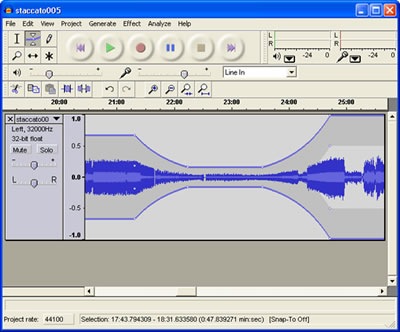
Having discussed a range of primary design and authoring tools, today's post will look at one of the key content development tools, an open source non-linear audio editor (NLE) called Audacity.

[It] is an easy-to-use audio recorder and editor for Windows, Mac OS X, GNU/Linux, and other operating systems .

(sourceforge.net)

Audacity has the capability to record live sound, convert analogue media sources, and manipulate audio. Its functions include:

  • Export to digital recordings like podcasts or CDs
  • Edit WAV, MP3, FLAC, and Ogg Vorbis sound files
  • Cut, copy, splice, and mix multiple audio files
  • Apply a range of digital signal processes including normalization, noise reduction, EQ, and compression

audacity audio editor

Figure 1 Audacity audio NLE

Audacity enables audio content may be exported in a wide range of formats, making it an exceptionally flexible tool for content developers. With a relatively shallow learning curve, the application can be used by non-experts after a few hours on instruction and use, while retaining the features found in proprietary NLEs like Steinberg WaveLab and Sony Sound Forge for media developers .

This level of functionality enables both SME and specialist content developers to take advantage of the features in the application in an Open Environment for E-Learning.

References:


Audacity website About Audacity [Internet] Available from: http://audacity.sourceforge.net/about Accessed 1 May 2008

--

Thursday, May 1, 2008

Open Environment E-learning 4: Mind Mapping Tools

Designing the structure of a syllabus, curriculum, or course is one of the key activities to be undertaken well to ensure the course meets the learners' needs. A discussion about approaches to instructional design is beyond the remit of this series of posts on developing learning content in an Open Environment; I recommend Benjamin Bloom's Taxonomy of Educational Objectives as a good starting place to investigate this broad discipline.

Now read on...

Instructional designers use a range of tools to develop the instructional design (ISD) of e-learning courseware, everything from pen-and-paper to word processors to more specialized ISD tools like mind mapping applications: one of the most effective of this latter category is Freemind.

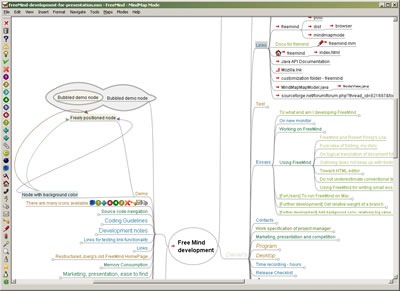
A mind map is a diagram used to represent words, ideas, tasks or other items linked to and arranged radially around a central key word or idea such as a learning objective. It is used to generate, visualize, structure and classify ideas, and as an aid in organizing content.

Mind map in Freemind

Figure 1 A mind map in the Freemind UI

FreeMind is an open source mind mapping application written in Java.

It supports the following features:

  • Folding of branches
  • Export to XML, HTML, XHTML (a static 'all-expanded image' plus expanding +/- list below image). Also exports an 'all-expanded image' in the following formats: PNG, JPEG, SVG and PDF format. Images are non-interactive. The current Beta version; v.0.9.0 Beta 8 supports export to Flash SWF).
  • Icons on nodes
  • Clouds around branches
  • Graphical links connecting nodes
  • Search restricted to single branches
  • Web and file hyperlinks from nodes

More tomorrow.

--

References:

Bloom B. S. (1956). Taxonomy of Educational Objectives, Handbook I: The Cognitive Domain. New York: David McKay Co Inc.

Links:

Freemind website on SourceForge.net [Internet] http://freemind.sourceforge.net/wiki/index.php/Main_Page (Accessed 30 April 2008)