The E-Learning Curve Blog has moved!

You will be automatically redirected to the new address in 10 seconds. If that does not occur for some reason, visit
http://michaelhanley.ie/elearningcurve/
and update your bookmarks.

Monday, June 30, 2008

Blogs and Podcasts, the Viking way

Not so much a post about e-learning today, but more about how Web 2.0 technology is being used to share information in the most extreme environments and circumstances.

If you're a regular reader of the E-Learning Curve Blog, you'll know that I include archaeology and the study of ancient cultures among my personal interests. Recently I posted on the 2008 Stonehenge dig, and today I'd like to talk about the return voyage of the Viking longship seastallion1Havhingsten fra Glendalough (Sea Stallion from Glendalough) from Dublin, Ireland to Roskilde, Denmark.

The Sea Stallion is a Danish reconstruction of Skuldelev 2, one of the Skuldelev ships. According to tree ring dating, the original ship was built near Dublin circa 1042.

The original ship was built with oak from Glendalough, Wicklow, Ireland, hence the ship's name. The reconstruction was built at the shipyard of the Viking Ship Museum in Roskilde from 2000 to 2004.

In the Summer of 2007, the longship made the voyage from Denmark to Dublin - a journey of exceptional endurance on the part of the boat and the crew, and fraught with a certain amount of danger, given the lousy weather we had in Northern Europe last year.

seastallion_dublin

If you saw these lads coming 1,000 years ago, it was time to pack up and leave... quick!

After wintering in the Collins' Barracks site of the National Museum of Ireland, the Sea Stallion is due to set sail for for her home port today.

Thanks to Web 2.0 information sharing tools and technology, you (and I) can share the journey with the crew via their daily blog and video podcasts, play a Viking Attack game, as well as follow the voyage via Google Maps live GPS tracking as the boat and her crew as they make their journey back across the North Sea to Denmark.

Bon voyage...

Saturday, June 28, 2008

Learning to go the right way...

...it just goes to show you where a mis-typed URL can land you: I was on my way over to the xyleme Xyleme Learning Pulse blog - I quite like The Blunted Edge opinion pieces there - when I accidentally dropped an extraneous "e" in front of "Learning" (finger memory I guess?).

Anyhoo, I was promptly directed to The eLearning Pulse Blog "Your daily source for all things eLearning." As the two primary contributors Ben Edwards & B.J. Schone there say themselves:

eLearningPulse is an independent online community focused on serving eLearning developers, from instructional designers to software developers to project managers.

This site provides free resources to the eLearning elearning_pulse development community, including news, discussion forums, job postings, and more. We realized that there wasn't a great place to rely on for this type of information in the eLearning field, so we built it ourselves.

eLearningPulse is free. We display eLearning-related ads on the site to pay our hosting fees. We may add features down the road that cost (like webinars, training), but for now everything is free.

While the blog has Forums, Videos, and other functions, of great use to me is the News feature: the eLearning Pulse aggregates e-learning news form abroad range of sources - just enough to allow you to skim headlines and straplines, much as you would with your Google Reader, Bloglines and so on.

So check out the eLearning Pulse.

...Check out both sites actually.

--

Friday, June 27, 2008

Online Presentation Tools as a Knowledge-Sharing Channel 4: assessment of authorStream and SlideShare

After yesterday's short digression into some of the finer points of heuristic evaluation, today I'm returning to the matter at hand: an assessment of the features and functionality provided by the authorSTREAM and SlideShare hosted presentation distribution services.

Now read on...

authorSTREAM is a web-based PowerPoint presentation sharing platform from authorGEN Technologies. After creating a presentation in Microsoft authorstream_logo PowerPoint, content creators can upload presentations to the authorSTREAM website. During the upload process the content is converted Adobe to Flash SWF format displayed via the Flash player. Content creators can use the provided HTML code to embed the presentation in a blog or website, as well to share the presentation via e-mail, and submit the content to YouTube. authorSTREAM also enables users to share their presentations via mobile devices that support MV4 playback such as the Apple iPod or iPhone.

Slideshare supports a range of import file types, including PowerPoint PPT, OpenOffice.org Impress, and PDF format. Broadly speaking, we can say that the SlideShare upload process shares many characteristics slideshare_logo with other Web 2.0 tools, and is in fact very similar to the authorSTREAM submission procedure. Generally speaking, once a file is uploaded and converted to SWF, it is publicly available.

The content creators can choose to make the slide show available to be downloaded. Interestingly for a service provided by a for-profit organization Slideshare is linked with Creative Commons, so various attribution licenses are supported (click here for more thoughts on Open Source Software). As with other hosted Web 2.0 services (including YouTube), a presentation can be viewed in the small screen or take the full screen of a monitor.

Table 1 authorSTREAM & SlideShare Feature Comparison

Feature

authorSTREAM

SlideShare

PowerPoint animations

Yes

No

PowerPoint animations with audio

Yes

No

Motion-based content (i.e. Flash animation / movies) in slides

Yes

No

Rehearsed timings

Yes

No

Voice-over narration

Yes

No

Embed code

Yes

Yes

Statistics

No

Yes

RSS Feed support

Yes

Yes

Full-screen playback

Yes

Via SlideShare.net only

Private content

Yes

Yes

PowerPoint file download

Yes

Yes

User Groups

No

Yes

General Observations: Content Authoring

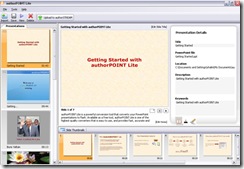
authorGEN provide authorPOINT Lite, an advanced multimedia presentation creation software utility, which installs in PowerPoint and offers a host of features for power users. Presenters can upload presentations directly from within PowerPoint with this add-on software.
authorpoint_lite_ss

authorPOINT is an advanced multimedia presentation creation software, which installs in PowerPoint as an add-in and provides a range of features for power users. Presenters can upload presentations directly from within PowerPoint with this utility. SlideShare does not offer any offline desktop utility to support the website service.

General Observations: Audio
authorSTREAM handles voice-over audio in presentations very well. Audio is retained in narrated PowerPoint presentations when uploaded to authorSTREAM. Authors can also create audio presentations using either live or pre-recorded audio as a media type via authorPOINT, before uploading to authorSTREAM.
SlideShare on the other hand, has a “slidecast” feature where the content author synchronizes a pre-recorded audio file online following upload to the server.

authorSTREAM's offline desktop application is a very flexible feature - potentially very useful for e-learning content, in my view.

General Observations: Content Distribution

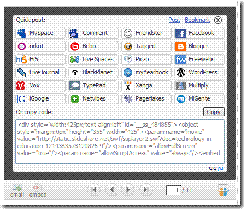
One very usable feature of SlideShare is it facility to enable extended distribution of content outside of it's native hosting environment. ss_embed_code By clicking on the <embed> button on the UI, both an author and any other user can either share the presentation via any one of a range of social networking services (see the screenshot for some examples) as well as provide the source code to enable the presentation to be embedded in a blog or web page, very similar to YouTube's functionality. A case could definitely be made that this type of portability will support the creation of Internet memes in environments where YouTube is not appropriate (due to bandwidth issues, for example).
Conclusions

So which service is better? Well, I guess that comes down to WIIFM - what's in it for me. The broad sweep of features and functionality are pretty similar on both services: deficiencies in one are accommodated by lack of functionality in the other, so it really comes down to personal choice.

My user experience of authorSTREAM was slightly superior to that of SlideShare: upload and conversion times were lower on the former service, for example. Equally, the enhanced slide animation and transition support on authorSTREAM was a positive advantage, as was the ability to view presentations in full-screen mode via a third party environment (my blog in this case). I also prefer the extended functionality afforded by the desktop-based client client, as well as the better audio integration.

In the end... well, I recommend that you try both out yourself, and you decide which service meets your needs.

--

Thursday, June 26, 2008

Online Presentation Tools as a Knowledge-Sharing Channel 3: heuristic principles in evaluation

Over the last couple of days I've been looking at the presentation-sharing channels authorSTREAM and SlideShare and how these two services enable the delivery of content via the Web. Both services rely on common read/write Web design and interaction patterns; like many other social sharing services, users are able to add tags, rate, comment, and embed content.

One of the nice things about assessing these two services is that it gives me a rare opportunity to discuss usability heuristics. According to Microsoft, the heuristic evaluation process is

a quick method to evaluate any user interface (UI) by using a list of heuristics or guidelines. Ideally, two or three people independently evaluate the UI using the heuristics so that the usability issues that each person finds can be compared. This evaluation technique can be used throughout the development process, from early screen shots to fully implemented code, but it is a good idea to run heuristic evaluations early in the development process so that the UI can be redesigned.

(Microsoft.com)

In this context, heuristics are "rules of thumb" or design principles used to evaluate the conformance of user interface (UI) features and functionality in computer applications. Probably the most well-known advocate of the heuristic evaluation approach is web usability consultant Jakob Nielsen.

Table 1 Nielsen's Heuristics

Heuristic

Description

Visibility of system status

The system should always keep users informed about what is going on, through appropriate feedback within reasonable time.

Match between system and the real world

The system should speak the users' language, with words, phrases and concepts familiar to the user, rather than system-oriented terms. Follow real-world conventions, making information appear in a natural and logical order.

User control and freedom

Users often choose system functions by mistake and will need a clearly marked "emergency exit" to leave the unwanted state without having to go through an extended dialogue. Support undo and redo.

Consistency and standards

Users should not have to wonder whether different words, situations, or actions mean the same thing. Follow platform conventions.

Error prevention

Even better than good error messages is a careful design which prevents a problem from occurring in the first place. Either eliminate error-prone conditions or check for them and present users with a confirmation option before they commit to the action.

Recognition rather than recall

Minimize the user's memory load by making objects, actions, and options visible. The user should not have to remember information from one part of the dialogue to another. Instructions for use of the system should be visible or easily retrievable whenever appropriate.

Flexibility and efficiency of use

Accelerators -- unseen by the novice user -- may often speed up the interaction for the expert user such that the system can cater to both inexperienced and experienced users. Allow users to tailor frequent actions.

Aesthetic and minimalist design

Dialogues should not contain information which is irrelevant or rarely needed. Every extra unit of information in a dialogue competes with the relevant units of information and diminishes their relative visibility.

Help users recognize, diagnose, and recover from errors

Error messages should be expressed in plain language (no codes), precisely indicate the problem, and constructively suggest a solution.

Help and documentation

Even though it is better if the system can be used without documentation, it may be necessary to provide help and documentation. Any such information should be easy to search, focused on the user's task, list concrete steps to be carried out, and not be too large.

So, what's in it for me as a learning professional?

In my view, the challenges of enabling learners to acquire new skills, knowledge and expertise is difficult enough, and anything that smoothes the path of this process should be implemented. The provision of a clear (maybe even formulaic) set of principles, rules, and guidelines at the design phase of an e-learning project, which should allow learners get comfortable with the learning environment should be a central tenet of every learning professional's design philosophy.

Oh. And as one of the rules for writing for the Web is

Be Succinct: write no more than 50% of the text you would have used in a hardcopy publication.

...and you, dear reader, have other things to do with your precious time.

I'm going to conclude today's post on this note, and return to authorSTREAM and SlideShare tomorrow.

___________________

References:

Microsoft Inc. (2008). Heuristic Evaluation Process. [Internet] Available from: http://www.microsoft.com/en-us/library/bb189150.aspx Accessed 20 June 2008.

Neilsen, J. (2005). Ten Usability Heuristics. [Internet] Available from: http://www.useit.com//papers/heuristic/heuristic_list.html Accessed 20 June 2008.

___________________

Links:

authorSTREAM.com

SlideShare.net

--

Wednesday, June 25, 2008

Online Presentation Tools as a Knowledge-Sharing Channel 2: SlideShare

Yesterday I started this short evaluation of web-based presentation sharing by going through the steps required to publish a presentation on authorSTREAM; today's presentation was generated and shared via the SlideShare hosting service.

Now read on...

Today's presentation, Technology in Education, is a draft version of something I'm working on so it's a little rough around the edges - it is OK for the objective of this test though.

--

This presentation will cover:

  • What is E-Learning?
  • Technology in Education (TIE)
  • Approaches to TIE
  • Benefits of TIE
  • Examples of TIE
  • Summary

Now that I've published content on both hosting services, tomorrow's post will establish the criteria for evaluation, and I'll write a little about my view on this method of content delivery.

Fógra: If you noticed that a there was a topic mentioned in the presentation objectives that wasn't covered in the body of yesterday's presentation on Rapid E-Learning Tools: well done.

There isn't a prize for noticing, but aren't you lucky you've been given the gift of good observation!

--

Tuesday, June 24, 2008

Online Presentation Tools as a Knowledge-Sharing Channel 1: AuthorSTREAM

I'm very impressed by some of the presentation-sharing tools available to educators. Over the next few days I'm going to evaluate two of them - authorSTREAM and SlideShare, starting with the former.

Now read on...

I think the best way to evaluate them is to go through the process of signing up, uploading content, using the functionality available to content authors, and finally assessing the user experience of viewing content via each site's UI.

Today's presentation is called "An Introduction to Rapid E-Learning."

At the end of this presentation you will know about:

  • Organisational uses of Rapid E-Learning tools
  • Authoring tools used in developing multimedia-based learning content
  • How these tools are implemented to develop content using the Rapid E-Learning methodology / approach
  • Introduction to Techsmith Camtasia
    • Stage
    • Menu
    • Task List
    • Clip Bin
    • Timeline
  • Practical
    • Create a learning object using Camtasia


Uploaded on authorSTREAM by mhanley

I'd be very interested to get feedback on any aspect of using this type of learning channel; if you have a view on this dear reader, let me know by posting a comment.

--

Monday, June 23, 2008

Connect Pro 7 - Notes from a seminar

As I said previously, I attended a seminar in Dublin about (deep breath) Adobe Acrobat Connect Pro 7, and just in case anyone is interested in attending a seminar themselves, or even considering using Connect, I've published my notes from the event here.

Content Creation

  • Enhanced content creation features via Microsoft PowerPoint
  • Supports animations, transitions, better support for importing on-screen text from PPT notes (no longer requires text to be html formatted)
  • Import and edit video in any format and export as SWF
  • Enhanced A/V tools: Better audio recording and editing features (ported from Adobe Captivate) new video recording / editing / rendering functionality.
  • Enhanced question creation tools: adds drag-and-drop / "fill in the blanks" question types.
  • New WYSIWIG question editing / formatting UI (previously done via PowerPoint's UI)

Question Development

  • Enables question pooling, answer shuffling (i.e. in multiple-choice questions, correct answer(s) will be shuffled randomly and re-assigned to a new position in the answer narrative so that a user can't memorise if answer(s) = a], b], c], d] etc)
  • Better integration with other content authoring tools (i.e. Captivate, Articulate, Camtasia)
  • Publish content as a PDF file, preserving animations
  • Better conformance to SCORM and AICC e-learning specifications for learner tracking
  • Support for Question-Test Interaction (QTI) standard and enterprise Learning Management System (LMS) integration
  • Better survey- and poll-creation tools

Connect new features -

Training:

  • New, more intuitive UI for users
  • Reporting now exposed as a series of 6 APIs for easier customisation
  • Enhanced, more granular reporting features
  • Enhanced report filtering including custom fields
  • Better LDAP integration

Output Options

  • Publish to Server
  • Publish to CD / DVD
  • Publish to PDF
  • Publish to mobile device format

Enterprise-level integration

  • Adobe are explicitly targeting the Enterprise Unified Communications space
  • Integrates with MS Office Communication Server 2007 (and LCS), as well as a range of other enterprise solutions (Cisco, SAP etc)

LMS Integration:

  • Better (if not perfect) integration with a range of LMSs - more to come on this in v7.5 and v8
  • Individual learning paths ("Service Planning") now supported

Meetings:

  • Support of breakout rooms under Meetings / Seminars
  • Meetings and seminars can now be tracked under Reporting
  • Ability to download and edit meetings for offline / asynchronous use

Acrobat 9

New features:

  • Enhanced Start Connect Meeting functionality direct from an Acrobat PDF document
  • Enables PDF document workflow & reviewing via Connect server document sharing functionality
  • Form creation via wizard
  • New Form tracker
  • Enables users to complete, save, and submit forms via Adobe Reader
  • File redaction (find / remove sensitive info from PDFs)

I still have to get my hands on an actual hosted implementation of Connect and I'm looking forward to seeing the enhancements "under the hood," as well as the new APIs, and trying out the new features. Equally importantly, I'll be looking at stress-testing the new server, just to see how it performs under actual production environment conditions in an organization.

Interesting...

--

Friday, June 20, 2008

High-Impact Learning Organizations - New Report

Bersin and Associates, the learning and development industry's research and advisory firm have just released their 2008 High-Impact Learning Organization report.

As you'll know if you follow the E-Learning Curve Blog (click on the link to subscribe, folks!), I have a strong professional and academic interest in workplace learning and worker- and organizational performance. So today I thought I'd look at some of the results of their research.

The research for this study is based upon an investigation of over 750 organizations, and examines trends, best practices, and strategic solutions in "modern training organizations." It focuses in particular on the specific processes and strategies that drive high levels of efficiency and business impact and provides information on

  • organizational structure
  • business alignment
  • leadership
  • governance
  • program measurement
  • learning architectures
  • integration with talent management
  • outsourcing
  • globalization
  • training the multi-generational workforce

In addition, this research provides analysis and case studies on the implementation of collaborative learning, e-learning, content management, content re-use, and learning on-demand.

Of particular use, is their referenceable table of High Impact Learning Dimensions.

Figure 1 High Impact Learning Dimensions
(Bersin & Associates, 2008)

Unusually perhaps for those not familiar with the dynamics of workplace learning, the results in Figure 1 emphasise the importance of a learning culture at the core of successful learning organizations. I have discussed the importance of this element of success learning in my own research:

Within ... organisations then, workers evolve a culture – what Bates and Plog (1990) define as “the system of shared beliefs, values, customs, behaviours, and artifacts that the members of society use to cope with their world and with one another, and that are transmitted through learning [my italics]” (p.7) - to enable groups to perform tasks within the context of the organisation. Recognition of the social and interactive nature of knowledge working was one of the key drivers for the live component of the [learning intervention under discussion]: at any given time, individual workers in the organisation have more-or-less tacit and explicit knowledge on a given topic than their co-workers, and collectively a very high level of expertise across a range of topics exists.

(Hanley, 2007, p.30)

I extend this by suggesting that

[a]s organisations are at root, cognitive enterprises, and the sum of the knowledge of the organisation is expressed collectively through the behaviour, skills and attitudes of its employees, the organisation is itself a cognitive entity. It continually constructs itself through the learning processes its members engage in.

(Hanley, 2007, p.55)

Similarly, the idea of culture being at the root of organizational learning and worker performance is central to Mary Broad's work on transfer of learning in Ensuring the transfer of learning to the job (2000), where she discusses organizational factors that affect performance and in particular institutional "barriers to learning" and their impact on workers' ability to enhance their performance through learning interventions.

I would assert that there is now a definite and perceptible shift in thinking around this subject: we can begin to say that this aspect of training is becoming more central to strategic and operational aspects of organizational development.

_______________

References:

Bersin & Associates (2008) The Top 18 for Learning [Internet] Available from: http://www.bersin.com/Resources/Content.aspx?id=7004 Accessed 20 June 2008

Broad, M (2000) Ensuring the transfer of learning to the job. IN: The ASTD Handbook of Training Design and Delivery. Piskurich, G. M. Beckschi, P. Hall, B. (Eds) pp.473-493). McGraw Hill.

Hanley, M. (2007) Is Non-Formal Learning an Effective Means of Enhancing Knowledge Workers’ Performance in a Small- to Medium-Sized Enterprise? Thesis Paper presented as part of the requirements for completion of the Master's Degree in Education & Technology. National College of Ireland, Dublin.

--

Thursday, June 19, 2008

Corporate learning environments - a framework

As discussed in previous blog entries, the 21st century corporate learning environment is a patchwork of systems, tools, technologies, and processes that support (more or less) individual and team learning, performance, and development.

We can say with a degree of certainty that it's the case that these systems are in place for a range of tactical, operational, and strategic reasons. According to Klein and Eseryl (2005) this agglomeration of systems can be viewed within

a framework based on the premise that different methods are needed for different levels of knowledge and expertise.
(The Corporate Learning Environment, p.8)

Klein and Eseryl extend Dillon and Hallett's 2001 learning curve model; by making it the basis for a framework (see Figure 1) that applies the notion of the conventional learning curve to the context of the corporate learning environment, they assert that to supply an "apt" structure for understanding when and how different learning approaches and strategies are used.

Figure 1 Framework for corporate learning environments (After Klein & Eseryl 2006)


[click to enlarge]

Within this framework, the conceptualization of the learning environment consists of systems to manage and support:
  1. cohesive team management
  2. knowledge generation and sharing
  3. performance support
  4. document storage and retrieval
  5. on-demand learning
  6. traditional training

___________________

References:

Dillon, P. & Hallett, C. (2001). Powering the leap to maturity: The eLearning ecosystem. Cisco Systems white paper.

Klein, J. Eseryel, D. (2005) The Corporate Learning Environment. [Internet] Available from: http://www.igi-pub.com/downloads/excerpts/159140505XCh1.pdf
Accessed June 12 2008
--

Tuesday, June 17, 2008

Constructivism, Learning Environments: An Introduction

There are a range of views on what the term ‘constructivism’ means in the context of learning, but it can be said that most definitions would agree that it has these characteristics:

  • Learning is an active process of constructing rather than acquiring knowledge and
  • Instruction is a process of supporting that construction rather than communicating knowledge.

(Duffy and Cunningham, 1996. p.171).

Bruner’s 1966 text Toward a Theory of Instruction described the key principles of constructivism (p.225):

Table 1 Principles of constructivism

Principle

Definition

Readiness

Instruction must be concerned with the experiences and contexts that make the student willing and able to learn

Spiral organisation

Structure.

The content must be structured so that it can be grasped by the learner.

Sequence.

Material must be presented in the most effective sequences.

Generation

“Going beyond the information given” - Instruction should be designed to facilitate extrapolation and or fill in the gaps

Extending from these basic constructivist principles as well as from the work of other key figures in the constructivist school, Driscoll (1994) outlines five conditions for learning (p.382-3). Very much like the multiple approaches and interpretations that exist in constructivism, a number of conditions must be met for the approach to be implemented. It is useful to elaborate briefly on these conditions, as they are relevant to the learning approach discussed in the rest of this part of the blog.
  1. Providing complex learning environments that incorporate authentic activity. Constructivists argue that learners should learn to solve the types of complex problem they will face in real life. Learning how to do this is difficult unless complex and authentic learning environments are available to the learners.
  2. Providing for social negotiation as an integral part of learning. Bruner (1986) explains that learning is a cultural interchange between group members. Collaboration creates an opportunity for learners to share their understandings with others and to have others do the same with them. This provides multiple perspectives to each learner, and this negotiation process between peers should lead to enhanced understanding.
  3. Support multiple perspectives and the use of multiple modes of representation. Because learning skills, behaviours and knowledge can be diverse and complex, constructivists believe that to achieve complete understanding the learner must examine the material from multiple perspectives. If they are not supported in this endeavour, the learner will achieve only a partial understanding of the material. Multiple modes of representation allow the learner to view the same content through different sensory modes.
  4. Nurture reflexivity. Duffy and Cunningham (1996) characterise reflexivity as “the ability of students to be aware of their own role in the knowledge construction process.” (p.172). It could also be described as the learner taking ownership of their own thinking and learning processes. Driscoll (1994) assets that reflexivity and by extension critical thinking are central attributes in the constructivist methodology, as it enables learners to understand how and why cognition creates meaning. This enables learners to attain goals such as reasoning, understanding multiple perspectives, and expressing and defending their own beliefs.
  5. The last condition Driscoll describes is to “emphasise student-centred instruction.” Bruner (1966) calls this “discovery learning”. By obtaining knowledge by themselves, learners select and transform information, construct knowledge, and make decisions in the context of a cognitive structure that provides meaning and organisation to experiences and allows the individual to “go beyond the information given”. Students are actively engaged in determining what and how they will study or gain understanding.

These principles and conditions position the constructivist approach to learning as an appropriate orientation for learning sans frontiers; using technologies like the Internet, websites and virtual learning environments, applying collaborative learning, problem-based learning and goal-based mechanisms, making Open Source Software and Course- and Content Management Systems accessible to learners, and using e-learning applications like online conferencing and collaboration tools could be the foundation for these multiple constructivist conditions for learning. (Duffy & Jonassen 1992, Driscoll 1994; Schank 1994)

These characteristics provide an appropriate framework for knowledge workers to learn (and for the learning intervention), given that their ongoing development is based in the context of already-established cognitive schemata (from the learners’ perspective), the knowledge and skills are applied to solve real-world problems, and their expertise (behaviours) are typically used in collaboration with their peers to enhance the performance of organisations.

___________________

References:

Bruner, J. S. (1966) Toward a Theory of Instruction. Cambridge, MA: Harvard University Press.

Bruner, J. S. (1986). Actual minds, possible worlds. Cambridge, Mass: Harvard University Press.

Driscoll, M. P. (1994). Psychology of learning for instruction. Boston, MA. Allyn & Bacon.

Duffy, T. M. & Cunningham, D. J. (1996) Constructivism: Implications for the design and delivery of instruction. IN: Jonassen D. H. (Ed) Handbook of Research for Educational Communications and Technology (pp.170- 198). New York: Simon & Shuster Macmillan.

Jonassen, D. H., (1994). Thinking Technology: Toward a constructivist design model. Educational Technology, 34(3), 34-37.

Schank, R. (1994) Active Learning Through Multimedia, IEEE Multimedia, 1(1), pp.69-78.

--

Firefox 3 released today...


...but they seem to be on the American clock.

It's 11.20 Irish Summer Time (UTC+1) and no sign of a link on the Mozilla Firefox European (EN) download page.

Hope it's Eastern Standard Time at least...

Update:
According to the BBC, the Mozilla Firefox v3 will be released at 18.00hr British Summer Time (UTC+1).

Monday, June 16, 2008

Media - a Constructivist view of principles

Constructivism is part of the Cognitivist gene pool, and as such it is appropriate to look at the impact of digital multimedia on cognition and learning.

In E-Learning and the Science of Instruction (2003), Ruth Colvin Clark and Richard E Mayer explore the research on the impact of media in e-learning across seven design principles:

  • Multimedia
  • Contiguity
  • Modality
  • Redundancy
  • Coherence
  • Personalization
  • Practice Opportunities/Simulations

Clark and Mayer assert that broadly speaking

Learning results from designing learning materials with the right instructional methods regardless of how the information will be delivered [my italics]. ...To help learners acquire new knowledge and skills, instructional methods including media elements such as sound, text, and graphics as well as learning aids such as practice exercises, must support human cognitive learning processes.

(p.2)

Regardless of the theoretical approach or instructional design used, learning happens in accordance with the capabilities of two memory components: working and long-term memory, as shown in Figure 1.

Effective eLearning supports critical psychological learning processes

Figure 1 Effective e-learning supports critical psychological learning processes

Working memory is where ideas are generated and learning takes place. However, working memory has a very limited capacity - according to Miller (1956) working memory has the capacity to retain 7±2 chunks of information. When working memory fills with even limited amounts of information, its processing power diminishes rapidly.

Long-term memory has a vast capacity for information storage; it is a person's knowledge and memory repository. However, long-term memory provides storage only - all the cognitive activity takes place in working memory. In learning, the goal is to create environments in which learners actively process new information in the working memory in ways that lead to storage in long-term memory. When needed, this information can be retrieved into working memory.

Positive learning outcomes require instructional methods that accommodate the limits of working memory and encourage processing of new information for storage in long-term memory.

(p.4)

The primary cognitive processes to be engaged include:

  • Attention
  • Management of load in working memory
  • Rehearsal of new information in working memory that results in encoding in long-term memory
  • Retrieval of new skills back into working memory when needed.

The authors suggest the following principles can be used to enhance the effectiveness of learning:

  • Include both words and graphics as long as the graphics convey information that
    is being taught and are not merely decorative.
  • Place corresponding words and graphics near each other.
  • Present words as audio narration rather than onscreen text.
  • Presenting words as both text and simultaneous audio narration can interfere with
    learning.
  • Adding interesting, but unnecessary, material can interfere with learning.

With this in mind, how much practice do learners need? We know that skill improvement can continue over many practice sessions—although with diminishing returns. The greatest amount of learning occurs in the first few practice sessions. How much practice to include depends on the criticality of the skills you are building, and on the extent to which performance can improve on the job. For some tasks, such as landing an airplane, it’s critical that the first performance is highly effective.


In other cases, learners can continue to practice and improve on the job. [Ruth Clark's] recommendation is to adjust the amount of practice according to the criticality of the tasks and the cost benefits generated by additional practice opportunities.

(2007, p.9)

_________________________

References:

Clark, R. (2007). Leveraging multimedia for learning. Use instructional methods proven to align with natural learning processes [Internet] Available from: http://www.adobe.com/products/captivate/pdfs/captivate_leveraging_multimedia.pdf Accessed 23 May 2008

Clark, R. C. and R. E. Mayer (2003). E-Learning and the Science of Instruction. San Francisco, Jossey-Bass
Pfeiffer.

Merrill, M. D. (2006a). First Principles of Instruction. In C. M. Reigeluth & A. Carr (Eds.), Instructional Design Theories and Models III (Vol. III). Hillsdale, NJ: Lawrence Erlbaum Associates, Publishers.

Merrill, M. D. (2006b). First principles of instruction: a synthesis. In R. A. Reiser and J. V. Dempsey (Eds.) Trends and Issues in Instructional Design and Technology. Columbus: Ohio, Merrill Prentice Hall.

Miller, G. A. (1956) The Magical Number Seven, Plus or Minus Two. The Psychological Review, 63(2), pp. 81-97

--

Adobe Connect 7: Finding out more

Well, the Adobe roadshow is coming to Ireland this week and I'll be attending the seminar to find out all about Adobe Connect 7.

The organization I work for already uses v6, and I'm really looking forward to seeing if all the v6 deficiencies (Flash 9 support, lousy API, some of the Admin reporting etc, etc) are addressed in this release.

It appears that now Macromedia and Adobe have fully integrated their development teams, they seem to be taking advantage of the best both have to offer. So what I'm expecting is the stable delivery platform we've come to expect from Macromedia, combined with the highly usable Adobe UI (as well as better integration with products from other stables).

From what I've seen so far (there's an interesting demo here), they have rebuilt the UI in Flex - and so far it looks quite promising. Other new features are recorded content offline editing & download, a beefed up version of Presenter, discrete breakout rooms, integration with MS LCS & OCS, better user homepage, and so on.

I guess I'll see for myself on Wednesday; I'll be posting my impressions of the app here, so stay tuned...

________________

Links:

Adobe Acrobat Connect Pro 7 Homepage

Friday, June 13, 2008

100 Helpful Web Tools for Every Kind of Learner

As you'll know if you viewed my post on Jane Hart's Centre for Learning & Performance Technologies (C4PT) I feel that the more exposure learning professionals have to the range of tools at our disposal, the more effectively we can develop effective learning solutions for our customers.

In a similar vein, I've just received a nice e-mail from Fiona King at College@Home about a similar list of tools.

I'll let herself explain:

I realize this is out of the blue, but we just posted an article, "100 Helpful Web Tools for Every Kind of Learner." I thought I'd bring it to your attention in case you think your readers would find it interesting.

If you follow the link to the web page, you'll see that Fiona has arranged the tools according to VAK learning style and by tool type:

  • Visual Learners
    • Mind Mapping
    • Charting and Diagrams
    • Videos and Photos
  • Auditory Learners
    • Podcasts
    • Presentation Tools
    • Audio Tools
    • Text Readers
    • Audio Books
  • Kinaesthetic Learners
    • Note Taking Tools
    • Bookmarking
    • Interaction
    • Collaboration

I have to state at this point that in my view I would question the effectiveness of the VAK-type learning style approach - see Coffield's article Learning styles and pedagogy in post-16 learning (link below) evidence for further information, but as a set of sensory categories for Fiona's purpose, they work just fine.

I think that even for those among us who would be familiar with a lot of the tools here (many of the "usual suspects" are on the list), there will be one or two new tools, and even useful new information about old favourites; did you know that Adobe Acrobat 8 has a text-to-speech reader, for example?

Me neither.

But I do now.

_____________

Links:

100 Helpful Web Tools for Every Kind of Learner

_____________

References:

Coffield, F., Moseley, D., Hall, E., Ecclestone, K. (2004). Learning styles and pedagogy in post-16 learning. A systematic and critical review [Internet] Available from: http://www.lsda.org.uk/files/PDF/1543.pdf Accessed 12 June 2008

--

Thursday, June 12, 2008

Constructivism and instructional design: more considerations

In this series of blog posts, I am considering the implications of learning and development for knowledge workers in the modern workplace, the limitations of the Systems Approach to training, and how to implement a Constructivist learning environment that can effectively and efficiently support knowledge workers.

Now read on...

In yesterday's post, and based on the work of Michael Molena, I suggested that the epitome of the Systems Approach, ADDIE, was less a development process and more a set of heuristics to facilitate instructional designers' efforts to develop e-learning content. I also outlined M. David Merrill's work to identify fundamental invariant principles of "good" instructional design, regardless of pedagogy. Merrill asserts that there is a core of consistent "Principles of Instruction" that we may use as the basis for content development regardless of the actual methodology used.

Merrill's primary and central principle of instruction is task-centered learning. A task is an activity that represents a problem that may be encountered in a real-world situation. Learning objectives or samples of the types of problems learners will be able to solve at the end of the learning sequence may also substitute for a task. A progression through problems of increasing difficulty are used to scaffold the learning process into manageable tiers of difficulty. The courseware should relate to real world problems.

Learner guidance helps focus the learner’s attention on critical elements of the information and relate these critical elements to the portrayal. The learner guidance that enhances the demonstration is indicated by bullets.

(2006a, p.4)

Merrill recognizes three categories of classification that provide information and can be portrayed:

  1. Kinds-of
  2. How-to
  3. What-happens

Kinds-of category

Concept classification occurs when learners must discriminate among members of two or more related categories of objects or events. An effective presentation/demonstration for concept classification (kinds-of) requires the following instructional activities.

  1. Tell learners the name of each category or alternative procedure.
  2. Show learners an example of each category.
  3. Provide learners a definition for each category.
  4. Show learners examples of each category.

How-to category
Procedure learning occurs when learners must carry out a series of steps. A presentation/demonstration for a procedure (how-to) involves the following instructional
activities:

  1. Show learners a specific instance of the whole task.
  2. Demonstrate each of the steps required to complete the whole task.
  3. Show the consequence of each step.
  4. Summarize the steps in the procedure and their sequence.

What-happens category
Process learning occurs when learners understand how some device works or the process underlying some phenomenon. A presentation/demonstration for a process (what-happens) involves the following instructional activities.

  1. Demonstrate the process in a specific, real or simulated situation.
  2. Repeat the demonstration for several increasingly complex scenarios.

In tomorrow's post we shall examine principles for the effective use of media in this learning environment.

________________________

References:

Merrill, M. D. (2006a). First Principles of Instruction. In C. M. Reigeluth & A. Carr (Eds.), Instructional Design Theories and Models III (Vol. III). Hillsdale, NJ: Lawrence Erlbaum Associates, Publishers.


Merrill, M. D. (2006b). First principles of instruction: a synthesis. In R. A. Reiser and J. V. Dempsey (Eds.) Trends and Issues in Instructional Design and Technology. Columbus: Ohio, Merrill Prentice Hall.

--

Wednesday, June 11, 2008

Is Constructivism incompatible with Instructional Design?

Before looking in depth at Constructivist Learning Environments (CLEs), we need to investigate the question "Is Constructivism incompatible with Instructional Design?"

In his 2006 essay First Principles of Instruction, M. David Merrill reviewed a representative range of instructional design theories, models, and research, "from basic descriptive laws about learning to broad curriculum programs that concentrate on what is taught rather than on how to teach" (2006b, p.1). Based on his research, the author elicited and synthesized elements common to Instruction, and used these to assess the underlying principles of instruction. The author describes principles as "relationship[s] that [are] always true under appropriate conditions regardless of program or practice" (2006a, p.1).

To be considered by Merrill, the principles he studied had to be
  • Included in most of the instructional design theories reviewed
  • Promote more effective, efficient, or engaging learning
  • Supported by research
  • General so that it applied to any delivery system or any instructional architecture (Clark 2003)
  • Design-oriented

From this set of criteria, the author identified five principles of instruction.
  1. The demonstration principle: Learning is promoted when learners observe a demonstration.
  2. The application principle: Learning is promoted when learners apply the new knowledge.
  3. The task-centered principle: Learning is promoted when learners engage in a task centered instructional strategy.
  4. The activation principle: Learning is promoted when learners activate relevant prior knowledge or experience.
  5. The integration principle: Learning is promoted when learners integrate their new knowledge into their everyday world.

1. The Demonstration Principle

Merrill asserts that principles are most appropriate for generalizable skills. These are skills that can be applied to two or more different specific situations. He asserts that the demonstration principle is most appropriate for three types of generalizable skill:
  1. concept classification (kinds-of)
  2. carrying out a procedure (how-to)
  3. predicting consequences or finding faulted conditions in the execution of a process (what-happens).
A generalizable skill is represented by both information and portrayal. Information is general, inclusive, and applicable to many specific situations. Portrayal is specific, limited, and applicable to one case or a single situation. Information can be presented (tell) and recalled (ask). A portrayal can be demonstrated (show) and submitted to application (do).
(p.3)

The demonstration principle emphasizes the use of specific cases (portrayal). Merrill considers that lack of sufficient demonstration is a "common problem" (p.3) in much instruction. While the demonstration principle is strongly biased towards portrayal, effective and efficient instruction involves both presentation of information and demonstration with portrayal. Table 1 shows information and portrayal modalities that are consistent for each of the three categories of generalizable skill. A presentation and demonstration must be consistent if they are to support effective, efficient and engaging learning.

Table 1 Consistent Information and Portrayal for Categories of Learning

[click to enlarge]

More...

__________________

References:

Clark, R. C. (2003). Building Expertise: Cognitive Methods for Training and Performance Improvement. Washington D.C., International Society for Performance Improvement.

Merrill, M. D. (1997). Instructional Strategies that Teach. CBT Solutions (Nov/Dec): 1-11. [Internet] Available from: http://cito.byuh.edu/merrill/text/papers/Consistency.PDF Accessed 24 May 2008.

Merrill, M. D. (2006a). First Principles of Instruction. In C. M. Reigeluth & A. Carr (Eds.), Instructional Design Theories and Models III (Vol. III). Hillsdale, NJ: Lawrence Erlbaum Associates, Publishers.

Merrill, M. D. (2006b). First principles of instruction: a synthesis. In R. A. Reiser and J. V. Dempsey (Eds.) Trends and Issues in Instructional Design and Technology. Columbus: Ohio, Merrill Prentice Hall.

--

Tuesday, June 10, 2008

ADDIE, and the Systems Approach: a Critical Analysis

In yesterday's post I looked at a systems approach to instructional design and development, and suggested that this approach was an emergent property of the process whereby instructor-led courseware developers in the 1990's attempted to apply previously-effective training development techniques to the new domain of e-learning.

As an example, I looked at the ADDIE design appraoch and suggested that it could be characterized as a set of heuristics (or conceptual framework) to enable learning professionals to output content commensurate with the systems approach.


Now read on...

In this context, we can say that ADDIE will only deliver results consistent with the expertise of the content designer, as it relies on their (the designers') skills and experience in transferring information and knowledge to "deliver" learning to the recipient. In E-Learning Strategies: how to get implementation and delivery right first time, Don Morrison remarks that

...like many ISD models it fails to give clear guidance about what makes good learning content. You can follow ADDIE to the letter and still deliver mediocre content.

(2004, p.255)

It can be said that ADDIE (and similar systems' approaches to learning content development) are closer in philosophy and practice to a project management methodology than a pedagogy. In this respect they can be a useful approach when developing "one-shot" training content in environments where repetitive worker activities are the norm.

Take this scenario as an example:

  1. Production workers have just started using the new WidgetMaker 300-0 tool: it can create 3o widgets per hour.
  2. As it's operating principles are very similar to the the older WM 299-8 (20 widgets per hour) model, the organization decides that workers only need a 2-day familiarization course before beginning production with the new tool.
  3. A new production target (30 WPH) is set for workers to reflect the increased efficiency of the tool.
  4. After three months, production is still 5WPH short of target. It turns out that workers are using the old production process on the new machine, and with the expectation of attaining 30WPH are actually working harder than ever, but are still 50% short of the difference between the new and old hourly production rate. Much disgruntlement all round.
  5. It seems that there's an extra gadget on the handle of the WM300-0 that nobody noticed because of the cursory nature of the 2-day familiarization course.
  6. Time for some training...

Table 1 Systems Approach Methodology applied to learning intervention

ISD Process Phase

Systems Inputs


People

Analyze

Organization sees deficiency in workers skill-base or competency set (causes lower productivity from the new widget-making tool, the WidgetMaker 300-0, than had been planned)


Material

Design / Develop

Two-day delta training developed


Technology

Implement

Training on new process delivered to learners


Time

Implement

ILT / WBT course delivered (Learners taken out of productive work to take training)

Evaluate

Workers complete certification on tool


Outputs

Outputs

Workers' productivity increased

Delta training integrated into updated operators' training program

As this example illustrates, treating learning like a project leads to "training outcomes" equivalent to project deliverables. While these training deliverables may have value in and of themselves, they have limited value for workers in the longer term. We could even say that the outputs are valid; workers have increased productivity and the next training course will have extra content to address the issue of lack of competency on the WidgetMaker 300-0. The efficiency of the system has been improved, and future trainees on the WidgetMaker 300-0 will not experience the productivity "hit" experienced by their colleagues. From a project perspective, it makes sense to fold the delta training into the course for the tool.

  • There are a number of negative consequence associated this approach
  • The delta training no longer exists as a discrete knowledge asset for the organization
  • Over time, specific knowledge of that particular learning intervention will be lost, half hidden among the overall learning goals of the WidgetMaker 300-0. Useless in effect, should another learner require remediation on that particular aspect of the tool
  • Without this discrete knowledge resource at workers' disposal, the only way to remediate their specific deficiencies on the tool is to require them to re-take the complete How to use the WidgetMaker 300-0 course. Again.

Our field of educational communications is founded on the premise that communicating content to students will result in learning. In educational communications, information or intelligence (in many different forms) is encoded visually or verbally in the symbols systems employed by each technology. During the "instructional" process, learners perceive the messages encoded in the medium and sometimes "interact" with the technology. Interaction is normally operationalized in terms of student input to the technology, which triggers some form of answer judging and response from the technology in the form of some previously encoded (canned) message. Technologies as conveyors of information have been used for centuries to "teach" students by presenting prescribed information to them which they are obligated to "learn."

(Jonassen, 2001)

Rather, Jonassen argues technology (and in particular so-called Read/Write Web technology) should enable learners to develop their skills in a constructivist learning environment (or CLE).

As a quick reminder, here's the Cliff Notes version of Constructivism:

  • We construct our own understanding of the world we live in
  • Knowledge not received from outside, but by fitting new information together with what we already know we construct knowledge in our head
  • Learning is the process of adjusting our mental models to accommodate new experiences
  • Constructivist theorists support that people learn best when they actively construct their own understanding

With this in mind (no pun intended. Well... maybe), we'll be looking at CLEs tomorrow.

____________________________

References:

Exclusive Interview with Professor David Jonassen (2001) IN: elearningpost [Internet] Available from: http://www.elearningpost.com/articles/archives/
exclusive_interview_with_professor_david_jonassen
[Accessed 12th January 2007]

Morrison, D. (2004) E-Learning Strategies: how to get implementation and delivery right first time Chichester: John Wiley & Sons, Ltd.

--

