The E-Learning Curve Blog has moved!

You will be automatically redirected to the new address in 10 seconds. If that does not occur for some reason, visit
http://michaelhanley.ie/elearningcurve/
and update your bookmarks.

Friday, May 30, 2008

Applying the e-learning curve in the corporate environment

In applying the concept of the conventional learning curve to the context of modalities of corporate learning, we find that the curve provides an appropriate structure for illustrating where how these modalities are used. For example, in the lower part of the 'S' bend of the learning curve - representing a new hire for example - we can say that a knowledge worker is still a not consumer of corporate resources, rather than a contributor to an organization.

These earliest stages can also be considered the “off-the-job training” segment meaning they are also the most expensive to the sponsoring organization.
Dillon & Hallett, p.18

As learners move up the curve, they move out of the classroom and into an on-the-job learning environment. As they approach higher levels of expertise, learners require more one-on-one or individualized approaches to learning. Because each worker has a unique set of knowledge and skill gaps separating him/her from the highest levels of expertise, it will take the mentoring intelligence of a live expert to detect and redress those gaps.

Over time, and as they acquire expertise through experiential learning knowledge workers will exhaust the list of colleagues upon whom they can rely for coaching and will need to rely upon their their own skills, knowledge and expertise to improve their performance.

Dillon & Hallett note that
one of the recent maturational leaps for e-learning has been the recognition that no one form of learning technology is capable of addressing the diverse range of learning modality requirements found in the modern workplace.
(p.18)

The authors labelled this "leap of recognition" as “the blended solution." I would suggest that this use of terminology reflects the time that the white paper was authored (2001): a more appropriate use of language would be to call each modality a learning delivery channel. Learning delivery channels can include different technologies - virtual classrooms, EPSS, software simulations, online collaboration, self-paced e-learning, knowledge management - they are much more than this: for example mentoring is a learning delivery channel, such activities can can be undertaken in a face-to-face or an online environment using video conferencing.

As Don Morrison says:
I find it difficult to give 'blended learning' the same respect I give, say, blended whiskey which is produced by the highly skilful blending of between 20 and 50 different ‘single’ malt and grain whiskies—of differing ages and from different regions and distilleries—to create a new brand with its own unique character. The greater the number of component whiskies, the greater the consistency of the resulting blend. If one of the contributing distilleries goes out of business, the blenders can achieve the same end result by adjusting the blend of the other single whiskies. If only such art, science, and commerce lay behind blended learning.
(The search for the holy recipe, pp.1-2)

The key to leveraging this leap of recognition is to enable knowledge workers to access learning content through the most relevant learning delivery channnel for their skill level. This can be illustrated by positioning the learning delivery channels along the learning-curve model. The picture that is formed by this allocation of technologies along the curve is what Dillon & Hallett call the “E-Learning Curve” (see Figure 1).


Figure 1 Dillon & Hallet's E-Learning Curve

The analogies to the conventional learning curve are apparent. Early in the learning process, workers using the conventional model of corporate training practices had to go off-the-job to attend classroom-based instruction. Knowledge workers in the e-learning 'ecosystem' learn from hours-long modules of Web-based training curricula. In this phase of the learning process, users of both conventional training and e-learning are removed from their job context.

As learners progress along the curve of the model, the allocation of learning delivery channels becomes more heavily influenced by e-learning modalities. With Web-based training (as with its instructor-led counterpart) the domains of usage are relatively limited. The only time it makes sense to pull workers off their jobs for training is limited precisely to those times when no alternative is available or resource-efficient. Off-the-job forms of training make good business sense only when workers are at the bottom of the learning curve and are not yet equipped to perform tasks at any acceptable level of competence.

More...

_______________________

References:

Dillon, P. & Hallett, C. (2001, October). Powering the leap to maturity: The eLearning ecosystem. Cisco Systems white paper.

Morrison, D., (2003) The search for the holy recipe. [Internet] Available from: http://www.morrisonco.com/downloads/blended_learning_holy_recipe.pdf Accessed 14 May 2008.

--

Thursday, May 29, 2008

Learning curves and the corporate environment

In their seminal 2001 white paper Powering the leap to maturity: The eLearning ecosystem, Pat Dillon and Chas Hallet suggest a useful interpretation and use for the traditional learning curve, and introduce their concept of the e-learning curve. They assert that emerging technology has changed the focus of corporate learning systems from task-based, procedural training to knowledge-intensive performance enhancement where learning interventions are broader-based, flexible, and more adaptable to meet the needs the needs of knowledge workers.

In their white paper, they apply the concept of the conventional learning curve to the context of the corporate learning environment in order to supply an appropriate structure for understanding when and how different modalities of learning are used. Within their framework, the conceptualisation of the learning environment consists of systems to manage and support:
  1. instructor-led training
  2. cohesive team management
  3. knowledge generation and sharing
  4. performance support
  5. content storage and retrieval
  6. on-demand learning

In a similar fashion, I have suggested that we can apply Bloom's Taxonomy of Educational Objectives to a conceptual model of a learning curve (see Figure 1) and begin to investigate how an "e-learning curve" based upon the modalities of that domain would align with the phases of learning in the traditional model.


Figure 1 Bloom's Taxonomy applied to a learning curve

In my view, a constructivist approach provides the most effective means of enabling adults to learn, particularly in the workplace. In the context of Bruner's principles of constructivism (see Table 1) technologies like the Internet, websites, and virtual learning environments, applying collaborative learning, problem-based learning and goal-based mechanisms, making Open Source Software and Course- and Content Management Systems accessible to learners, and using e-learning applications like online conferencing and collaboration tools could be the foundation for these multiple constructivist conditions for learning. (Duffy & Jonassen 1992, Driscoll 1994; Schank 1994)


Table 1. Principles of constructivism (Toward a Theory of Instruction, p.225)

Principle

Definition

Readiness

Instruction must be concerned with the experiences and contexts that make the student willing and able to learn

Spiral organisation

Structure.

The content must be structured so that it can be grasped by the learner.

Sequence.

Material must be presented in the most effective sequences.

Generation

“Going beyond the information given” - Instruction should be designed to facilitate extrapolation and or fill in the gaps

These characteristics provide an appropriate framework for knowledge workers to learn (and for the learning intervention), given that their ongoing development is based in the context of already-established cognitive schemata (from the learners’ perspective), the knowledge and skills are applied to solve real-world problems, and their expertise (behaviours) are typically used in collaboration with their peers to enhance the performance of organisations.

More tomorrow, when we apply e-learning modalities to the learning curve.

FÓGRA: Somebody asked me what does "fógra" mean.
Fógra (pron. fowgrah. equal emphasis on both syllables) is the Gaelic Irish word for "Notice."
_____________________

References:

Bruner, J. S. (1966) Toward a Theory of Instruction. Cambridge, MA: Harvard University Press.

Dillon, P. & Hallett, C. (2001, October). Powering the leap to maturity: The eLearning ecosystem. Cisco Systems white paper.

Driscoll, M. P. (1994). Psychology of learning for instruction. Boston, MA. Allyn & Bacon.

Duffy, T. M. & Cunningham, D. J. (1996) Constructivism: Implications for the design and delivery of instruction. IN: Jonassen D. H. (Ed) Handbook of Research for Educational Communications and Technology (pp.170- 198). New York: Simon & Shuster Macmillan.

Schank, R. (1994) Active Learning Through Multimedia. IEEE Multimedia, 1(1), pp.69-78.
--

Salasaga: an Open Source E-Learning IDE

I recently authored a series of posts on developing e-learning content using an open source environment where I investigated the potential for creating and delivering e-learning using either free to use or freely available content authoring applications. In that series, I deliberately excluded mentioning tools to enable the capturing and post-producing demos and simulations, as the applications currently available that enable developers to create high-quality SWF-based content (such as Captivate and Articulate) come with a hefty price tag. However, that may be about to change.

Now read on.

For a while, I've been following the development path of an open source integrated development environment (IDE) called The Flame Project which

brings what Adobe Captivate offers to the Windows community, to Linux/*nix and others. The final aim is to provide functionality superior to Adobe Captivate, by enabling production of in-depth eLearning with properly verifiable results.
Flame has been renamed Salasaga, and the application is now available as and alpha release for Linux Ubuntu.


The developers' vision is

...imagine a free, easy to use GUI authoring environment that helps you create visually impressive and actually useful learning material. The short term goal for this project is to provide such an environment, and we're well on the way to a first release for doing that.

Initially similar to Adobe Captivate, but will eventually incorporate an AJAX (browser based) playback capability for advanced content. Flash has at least one serious design limitation (from my POV) making it nearly useless for comprehensive eLearning, and this appears to be addressed by the existing capabilities of AJAX in browsers these days.

As an alpha release, the IDE is not stable or functional enough to be used in a production environment, but in my view it shows great potential (particularly now that Adobe have opened up the runtime on Flash (as reported here), thereby freeing up developers to actually work with the code from the 'inside.'

Where Salasaga differs from tools like the popular Jing screen capture application, is that the former is available under the GNU LGPL, the latter is a free-to-use product created by TechSmith (of Camtasia fame). While Jing is a great little tool, it is, as the owners say "free for now" - similarly, the owners decline to state for how long the application will be publicly available. Finally, Jing content created by all its users is stored and delivered on TechSmith's ScreenCast streaming media hosting service, which locks content creators in to using TechSmith's solution end-to-end.

From an open source development perspective, this is not ideal.

The current system requirements to run Salasaga are:

Operating Systems

  • Linux
  • *BSD
  • Solaris Nevada
  • Windows XP - No development build presently available
  • Windows Vista - No development build presently available

Most recent distributions of Linux should work out of the box. Debian Testing on AMD64 has specifically been reported to work.

Please note that the *BSD, Solaris Nevada, and Windows testing only gets done around package creation time.

Requirements

  • Glib and GTK+ - version 2.10 or higher of both is known to work
  • Pango - version 1.16 or higher is known to work
  • libxml2 - version 2.6.30 or higher is known to work
  • Ming - version 0.3.0 or higher is known to work
Click here to view a short demo about installing Salasaga - presumably recorded and produced using the IDE.
--

Wednesday, May 28, 2008

Ten years gone...


Phil Hartmann

Born September 24, 1948

Died May 28, 1998 (aged 49)

Ten years gone.

R.I.P.

Tuesday, May 27, 2008

Fundamentals of learning curves

In the introduction to yesterday's blog post, I alluded to the axiom that 'practise makes perfect' - the concept that the acquisition and improvement of new skills, knowledge or expertise are broadly predicated upon the learner's facility to rehearse and become more proficient in the tasks or activities being practised. This is not news - we have all experienced this process - and behaviorists would assert that perhaps we know it intuitively.

What is surprising is that the rate and shape of improvement is fairly common across learning.

The concept of the learning curve illustrates a simplified model of learning in which knowledge of a given subject is acquired through a progression of steps. Figure 1 shows a model of an idealized (and simplified, and in no way scientifically accurate) learning curve applied to Bloom's Taxonomy. At the lowest levels of the curve, the learner is a novice who then progresses through the various stages of cognitive development, where at each stage they increase in competency until (perhaps up to 10 years later) they reach an expert level of competency in the subject matter being tracked.


Figure 1. Bloom's Taxonomy charted on a learning curve

The learning curve has substantial implications for e-learning: it suggests that practice always helps improve performance, but that the most dramatic improvements happen first, with smaller and smaller incremental improvements being accrued over time. Another implication is that with sufficient practice people can achieve comparable levels of performance. For example, extensive practice on mental arithmetic (Staszewski reported in Delaney et al., 1998) and on digit memorization have turned average individuals into high performers.

The learning curve was devised from the historical observation that individuals who perform repetitive tasks demonstrate an improvement in performance as the task is repeated over time. First studied empirically in the 1930's by T. P. Wright's Factors Affecting the Cost of Airplanes, three conclusions were drawn upon which the current theory and practice surrounding learning curves are based:

  1. The time required to perform a task decreases as the task is repeated
  2. The amount of improvement decreases as more units are produced, and
  3. The rate of improvement has sufficient consistency to allow its use as a prediction tool

In this study, Wright concluded
that consistency in improvement has been found to exist in the form of a constant percentage reduction in time required over successively doubled quantities of units produced. The constant percentage by which the costs of doubled quantities decrease is called the Rate of Learning.


More...

References:

Delaney, P. F., Reder, L. M., Staszewski, J. J., & Ritter, F. E. (1998). The strategy specific nature of improvement: The power law applies by strategy within task. Psychological Science, 9(1), 1-8.

Wright, T.P. (1936). Factors Affecting the Cost of Airplanes. Journal of Aeronautical Sciences, 3.4 : 122 -128.
--

Monday, May 26, 2008

Definition of an E-Learning Curve

A colleague recently asked me "What is an e-learning curve?"

Well, when I originally started The E-Learning Curve Blog, my primary concern was to create a witty electronic learning-related title that hopefully caught my potential audiences' eye, and the name implied that the content of the blog would be a learning journey - for me as much as anyone. I can't deny that it's also a nice pun, or humourous play on words.

While undertaking some research on a different topic recently (learning objects - more to come about this in a few weeks), the term 'e-learning curve' cropped up with a certain regularity. Those occurrences, as well as my colleague's query have prompted me to write a short series on Curves (not the geometric kind).

Now read on.

We're all familiar with the old joke about the lost tourist in New York asking a cop how to get to Carnegie Hall. To which the cop replies "Lady, you gotta practice real hard."

Going back to the fundamentals, when we talk about learning, we're discussing ways to acquire new skills, knowledge or expertise. When we use learning curves, we're looking at approaches to measuring the growth or development of these abilities in the individual or group. As learning professionals working, we are perhaps most familiar with Bloom's Taxonomy of Educational Objectives are a means of evaluating a learner's current knowledge- or skill assets, and creating content accordingly to enhance and develop their current cognitive abilities(see Table 1). As is traditional, I will now mention the lesser-known domains, only to ignore them from this point forward...

Bloom identified three domains of educational activities:

  • Cognitive: mental skills (Knowledge)
  • Affective: growth in feelings or emotional areas (Attitude)
  • Psychomotor: manual or physical skills (Skills)


Table 1. Bloom's Taxonomy

Competence Level

Skills Demonstrated

Knowledge
Recall data or information.

observation and recall of information

knowledge of dates, events, places

knowledge of major ideas

mastery of subject matter

Associated verbs:
list, define, tell, describe,
identify, show, label, collect, examine, tabulate, quote, name, who, when, where, etc.

Comprehension
Understand the meaning, translation, interpolation, and interpretation of instructions and problems. State a problem in one's own words.

understanding information

grasp meaning

translate knowledge into new context

interpret facts, compare, contrast

order, group, infer causes

predict consequences

Associated verbs:
summarize, describe, interpret, contrast, predict, associate, distinguish, estimate, differentiate, discuss, extend

Application

Use a concept in a new situation or unprompted use of an abstraction. Applies what was learned in the classroom into novel situations in the work place.

Use information

use methods, concepts, theories in new situations

solve problems using required skills or knowledge

Associated verbs:
apply, demonstrate, calculate, complete, illustrate, show, solve, examine, modify, relate, change, classify, experiment, discover

Analysis
Separates material or concepts into component parts so that its organizational structure may be understood. Distinguishes between facts and inferences.

Seeing patterns

organization of parts

recognition of hidden meanings

identification of components

Associated verbs:
analyze, separate, order, explain, connect, classify, arrange, divide, compare, select, explain, infer

Synthesis
Builds a structure or pattern from diverse elements. Put parts together to form a whole, with emphasis on creating a new meaning or structure.

Seeing patterns

organization of parts

recognition of hidden meanings

identification of components

Associated verbs:
analyze, separate, order, explain, connect, classify, arrange, divide, compare, select, explain, infer

Evaluation
Make judgments about the value of ideas or materials.

compare and discriminate between ideas

assess value of theories, presentations

make choices based on reasoned argument

verify value of evidence

recognize subjectivity

Associated verbs:
assess, decide, rank, grade, test, measure, recommend, convince, select, judge, explain, discriminate, support, conclude, compare, summarize


When designing content, the taxonomy can be used as part of a holistic approach learning and development, rather than as a linear model (see Figure 1).


Figure 1. Bloom's Rose. [Source: John Manuel Kennedy Traverso]

Bloom's taxonomy is hierarchical - learning at the higher levels is dependent on the learner attaining prerequisite knowledge and skills at lower levels (Orlich, et al. 2004). Similarly, the verbs associated with Bloom's taxonomy must enable the learning professional to elicit a measurable result from the learner. From this perspective, we can say that learning can be quantitatively assessed and tracked, and these assessments can be represented on a graph, which leads us neatly to learning curves.

More tomorrow.

_____________________

References:

Bloom B. S. (1956). Taxonomy of Educational Objectives, Handbook I: The Cognitive Domain. New York: David McKay Co. Inc.

Orlich, C., Harder, R., Callahan, R., Trevisian, M., & Brown, A. (2004). Teaching strategies: A guide to effective instruction. (7th ed.). Boston: Houghton Mifflin Company.

St. Edward’s University Center for Teaching Excellence. (2004) Task Oriented Question Construction Wheel Based on Bloom’s Taxonomy.
[Internet] Available from:
http://www.stedwards.edu/cte/media/BloomPolygon.pdf [Accessed 15th May 2008]

--

Wednesday, May 21, 2008

Online Media Delivery Channels to benefit E-learning

In my last blog post I wrote about the optimism learning professionals are currently expressing about the short- to medium-term growth of the industry, despite the current economic climate, and the traditional impact that recessionary times have on learning and development in organizations. I've been thinking hard about the factors that may be influencing attitudes, but I'm not ready to put my thoughts to (electronic) paper just yet.

So today, I'm going to look at some developments that have the potential to positively affect e-learning content delivery.

Now read on...

I have talked on other occasions about using what Douglas Adams called PETs (Personal Electronic Things) to deliver e-learning content. On May 20th, British e-learning company Atlantic Link announced that they had developed an e-learning authoring solution for the Sony PlayStation Portable (PSP). According to their press release:

Atlantic Link's ...rapid e-learning authoring tools ... now allow courses to be designed specifically for the Sony PSP Slim & Lite. The courses can be deployed locally (from the Memory Stick Duo) or from the Internet, giving users a true mobile learning experience ... all the functionality of Atlantic Link’s rapid e-learning authoring tools can be applied to small screen format.


[Click image to view demo]

Atlantic Link MD Mike Alcock states:

The potential applications for this technology are huge ... [t]ourist guides, language training, product training and updates, maintenance guides and training, medical training, interactive museum guides, schools training, the list is almost endless.

Based on the information available from Atlantic Link's website, I can't tell whether the organization have developed a new set of templates for their current Rapid e-Learning authoring tools, or have created a new authoring platform specifically for PSP /Lite content development.

Given the range of potential applications for their content development system, Atlantic Link may have opened up a niche market for themselves by repurposing e-learning content authoring tools to deliver informational material in predominantly non-networked environments (see Mr. Alcock's quote above).

Is this innovative or new?

No.

Flash Lite has been around since 2004; what Atlantic Link seem to have done is created a point solution by simplifying the authoring environment (much like Captivate and Articulate do) to enable output on the PSP device. Similarly, I can't discern from the press release or website whether this content supports learning tracking, SCORM / AICC specifications and learners' formative and summative test results can be sent to and stored on an LMS.

It also may be the case that this type of approach has just been overtaken by events.

As well as announcing the latest version of their enterprise collaboration solution Adobe Connect Pro 7 (I'll review it once we get our sticky hands on it here in the office), Adobe have also announced the Open Screen Project, which they say is

dedicated to driving consistent rich Internet experiences across televisions, personal computers, mobile devices, and consumer electronics.

[by] taking advantage of Adobe Flash Player and, in the future, Adobe AIR -- that will remove barriers for developers and designers as they publish content and applications across desktops and consumer devices, including phones, mobile internet devices (MIDs), and set top boxes. The Open Screen Project will address potential technology fragmentation by allowing the runtime technology to be updated seamlessly over the air on mobile devices. The consistent runtime environment will provide optimal performance across a variety of operating systems and devices, and ultimately provide the best experience to consumers.

To support the Open Screen Project along, Adobe is:

  • Opening up the runtime to Flash Player so that anybody can develop a customized player. Specifically, it is going to open up the SWF and FLV/F4V specifications. In the past, developers had to sign agreements not to create derivative Flash players because Adobe wanted to avoid the fragmentation that Java experienced during its early years.
  • Removing licensing fees for Flash on mobile devices. While Flash is free on PCs, cell phone makers and other device manufacturers must pay a royalty fee. Instances of Flash are on 500 million mobile devices already (expected to grow to one billion over the next 12 months). As of the next major release of Flash (and AIR) for devices in 2009, it will be free to device manufacturers.
  • Publishing the APIs for porting Flash to other devices. This currently also incurs a royalty fee. Now, every device should come with a pre-installed Flash API.
  • Publishing Adobe protocols for pushing content to devices like Flash Cast and AMF. Adobe will also work with wireless carriers on protocols for over-the-air software updating.

I would suggest that the primary implication for learning professionals is that this could be the basis for a common (if not open) platform to enable learning materials to be delivered via multiple channels. With the support of a range of hardware manufacturers, there seems to be little threat of vendor lock-in; maybe manufacturers have finally understood that wider customer access has the potential to generate higher revenues than forcing people to use proprietary communications solutions?

in any case, being able to create content for a ubiquitous, device-independent platform will make my life less complicated and I suspect the same goes for a lot of other people too.

FOGRA: I was meant to be presenting at this year's ILTA EDTech 2008 Conference on 'non-formal workplace learning', but had to cancel due travel commitments: best of luck to all attending and presenting - I'll be keeping up with activities on the ILTA website.

--

Monday, May 19, 2008

E-Learning and the Economic Downturn : Why isn't the hammer falling?

After a weekend of listening to The Works by Queen, I've been trying to find a way to squeeze one of the album's song titles into a blog post, and by Jove, I think I've got it!

Now read on...

Today I'm returning to one of my occasional topics - tracking the state of the e-learning industry through the economic downturn / recession of 2008. In my first post on this topic I outlined my views on potential scenarios and described what in my view differentiated this depressed market from the post- Dot Com era. Following up on that, I presented the end-of-year financials of two of the biggest organizations in the industry, and potential difficulties they may face in 08H2.

Today, I'm investigating stakeholder sentiment (in the form of opinions from learning professionals as presented in their blogs, columns, and forums). And the question I have to ask is "Why don't people feel that the hammer will fall (sic) on the e-learning industry this time around?"

The prevailing feeling seems to be one of optimism, and that this is in fact a time of opportunity for the industry:

Sam S. Adkins, Chief Research Officer of Ambient Insight suggests that
According to a new longitudinal study by Ambient Insight on the private investment trends in the learning technology industry, capital is flowing at the highest rate since the last recession...

  • Funding in the first quarter of 2008 has reached 64% of the 2007 total and now totals more than all the investments made in the entire year of 2006
  • Investment in Self-paced eLearning products designed for the corporate buying segment dominated between 1999 and 2003, but funding for these types of products has dropped dramatically in the last four years and now trails other product types
  • Digital reference-ware, Collaboration-based Learning, social network-based learning (peer-generated), and learning services firms, respectively, are now attracting the largest investments
  • Funding for Simulation-based Learning and Game-based Learning products, particularly virtual world platforms designed for young children, has increased significantly in 2007. This trend continues in the first quarter of 2008 and this product type is now on track to outpace investment in Self-paced eLearning

At G-Cube Solutions, Ankit Jain asserts:

...[the] growth of e-Learning is the function of two important factors. Factor Number One is the competitive cost advantage and Second Factor is the enabling qualities such as enhanced reach and learning impact.
In a 'normal' US economy, he predicts that
[e-learning] not only substitutes class room training but achieves better results to the learners.
Should a recession develop, he considers
Lower revenues and lower profits for US corporations certainly means cut in L&D spending. However, I have strong views that e-Learning in relative terms is likely to benefit from recessionary conditions as it is a proven cost friendly alternative to a traditional class room. ... In my views the share of e-Learning hours will increase to over 40-50% from current 30% due to two factors - lowered base of number of training hours (as expected during recession) and increased share of e-Learning as such. ... [the] e-Learning industry in general has a great future irrespective of US recession.
On Learning Town, Brett Andersen of The Bank of America says
With financial cutbacks come greater restrictions, such as hiring freezes, significantly lower budgets, etc. And with less money and fewer resources, training and development employees have the challenging OPPORTUNITY to be more creative, manage their expenses more wisely and, in many ways, work in ways perhaps should have been considered before the economic challenges and perhaps should be considered after the economic challenges. Though I would not want these challenges to remain with us for long, I believe strongly that there is something for each of us to learn and to develop within ourselves, our teams, our organizations and our industry.
On the same forum, David Barton of Michelin North America makes this statement:
For the first time in the 13 years that I have been working with technology enabled learning in North America, our global learning and development group is seriously exploring it's use.
Similarly Maya Frost thinks that "In A Recession, Online Education May Be A Smart Investment."
Why? Because when people get nervous about their job security, they start looking around at their options. Many may consider taking online courses to prepare for the worst and position themselves more strategically for the next career move.
I'll be analysing why such a broad range of people are so bullish about the e-learning industry over the next few days.

--

Friday, May 16, 2008

End-to-end Development Process: E-Learning Course Development in an Open Environment: Project Lifecycle 8

Having discussed in some detail individual elements of the content development process, in this post we’re going to see how all the pieces come together in the Open Environment for E-Learning.

Figure 1. Inputs and Outputs
[Click to enlarge]

Here’s the end-to-end development process (see Figure 1):
1. Content authors agreed course structure according to the structure outlined in the instructional design
2. XML text data authored with XXE and the DocBook DTD
3. Images created and in GIMP and imported in to XXE
4. Course developed in XXE
5. Content reviewed and signed off
6. Content stored on Apache/MySQL/PHP-based content management system (CMS)
7. Narration script text generated from signed off content
8. Using Audacity, voice-over narration for multimedia presentation is recorded
9. Voice-over narration is post-produced in Audacity, reviewed and signed off


Final integration
1. Content accessed from CMS
2. XML data imported into OpenOffice.org Impress and exported as PPT-formatted file
3. Audio retrieved from database
4. Separately recorded video content retrieved from database
5. Content integrated in Microsoft Producer 2
6. Content rendered to final compiled format for delivery via multiple channels (see Figure 2)

Figure 2. Overview of Integration Process
[Click to enlarge]

7. Content exported to open source LMS/LCMS such as Moodle, or burned to DVD for delivery to customers (see Figure 3)

Figure 3. Final Course Structure
[Click to enlarge]

--

Thursday, May 15, 2008

Introduction to Repurposing Content. E-Learning Course Development in an Open Environment: Project Lifecycle 7

Modifying previously-produced content using for use in an Open E-Learning Environment

A topic I’ve touched on briefly in the past is that of repurposing content already developed in a different format. In my view, one of the more common (and unsatisfactory) processes used to develop courseware is to use Microsoft PowerPoint as the primary courseware authoring application. While the reasoning behind this is practical – for example, instructors delivering training in a classroom environment typically use PowerPoint as their presentation tool of choice, particularly in the corporate environment. Similarly, courses authored in PowerPoint can also end up being used as the basis for hard-copy document generation.

A typical process includes:

  1. Content (i.e. a series of lessons) authored in PowerPoint
  2. Lesson text extracted from PowerPoint imported into Microsoft Word. The content text is reformatted to enhance usability in hardcopy form (i.e. slide header made bold, 14 point etc)
  3. Slide images and text exported as WMF format images from PowerPoint and stored in a graphic assets folder for integration into the Word document version of the courseware.
  4. Because of file size issues, WMF images batch converted to high-quality GIF format.
  5. Images reinserted in Word document with adjoining text.
  6. Typically 10 to 12 lessons then inserted into a Word template and saved.
  7. Saved documents exported as PDF file in Adobe Acrobat Pro.

There are a number of significant inadequacies in this process, not least among them being:

  • complicated editing
  • difficulty revising materials
  • lack of traceability
  • versioning issues
  • discoverability of keywords and terms in either the source Microsoft Office application files or the compiled PDF document
  • severely restricted interoperability of content
  • restricted ability to deliver content using multiple channels (i.e. efficiently over the web)
  • use of proprietary formats to create content

Proprietary tools do not “play well with others” (Meyerding, 2004). For example, the Microsoft Office productivity suite has a long history of file format changes and despite the much-vaunted interoperability of Microsoft XML Core Services (MSXML) in Office 2007, it can be said that there are still issues with integrating MS Office-produced content into an open environment, and by extension problems using this suite if you need to integrate your content into another environment or platform.

--

References:

Meyerding, H. (2004). XML and Content Reuse Systems for Instructional Design Part 2: Implementing Content Repositories & Selecting Tools Part 1 The eLearning Developers Journal 3(1) [Internet] Available from: http://www.elearningguild.com/articles/abstracts/index.cfm?
action=view&CFID=822922&CFTOKEN=16828758
(Subscription required) Accessed 22nd October 2006

--

Wednesday, May 14, 2008

Course Structure. E-Learning Course Development in an Open Environment: Project Lifecycle 6

Operationalizing a Shareable Content Object-based (SCO) instructional design:

Based upon the the instructional model discussed in previous posts, I recommend designing a course to the following parameters (see Figure 1):

  • Section: a sequence of 5±2 Lessons related by core Learning Objectives
  • Lesson: a sequence of 5±2 Learning Objects
  • (Reusable) Learning Object (LO): a learning objective comprising a series of Learning Points; unit of assessment that measures the objective.
  • Learning Point/Reusable Information Object: a unit of instruction that teaches a key element of a learning object.
  • Knowledge Object (KO): a discrete piece of instruction or information represented textually, graphically, aurally, visually, by using animation. Combines with other KOs to create a Learning Point.

Figure 1. Course Structure
[click to enlarge]


Within the course, lessons are aggregated to the following order of granularity in the lesson structure (see Figure 2):
  • Each Lesson has 5±2 Learning Objects
  • Each LO has 5±2 Learning Points (aka RIOs)
  • Each LP contains a number of relevant Knowledge Objects
  • KOs/LPs are developed using appropriate media types


Figure 2. Lesson Structure
[click to enlarge]


Tomorrow: Modifying content created for different delivery channels for inclusion in an open e-learning environment

--

Tuesday, May 13, 2008

Outlining the Course Specification. E-Learning Course Development in an Open Environment: Project Lifecycle 5

Courseware Content Specification

After yesterday's discussion of a learning object-based approach, we can begin to develop a specification for on Open Environment e-learning course. At a high level, the specification for such a course could include:

  • Content to be based upon previously-agreed curriculum of content
  • The content be developed according to a Reusable Learning Object approach
  • Short development cycle -– three weeks proposed

Content Format
The content would be delivered in adherence to the following criteria:

  • A multimedia mix of audio, video, graphics, on-screen text.
  • Content to be stored and delivered on a Learning Management System. Content to be delivered via Flash-based a streaming media solution.
  • Content may also be delivered via download.
  • A DVD-based modular self-paced learning solution also be made available for learners with bandwidth issues.
  • Supplementary learning resources: starter kits, exercises, workshops, “how to’s”, case studies, email links to instructors, Web links to relevant resources associated with the courseware.

--

Monday, May 12, 2008

Defining Learning Objects. E-Learning Course Development in an Open Environment: Project Lifecycle 4

In reaching a satisfactory definition of learning objects, a search through the literature revealed three broad characterisations:

The main idea of 'learning objects' is to break educational content down into small chunks that can be reused in various learning environments, in the spirit of object-oriented programming.

(Wiley 2000)

[A]ny entity, digital or non-digital, that may be used for training, education or technology supported learning.

(LTSC 2002)

…modular digital resources, uniquely identified and metatagged, that can be used to support learning.

(NLII 2002)

From these descriptions, we can develop a working definition of a learning object:

A Learning Object is any digital resource that can be reused to support learning.

This definition contains the following attributes:

  • Learning objects are digital – can be stored and delivered electronically
  • Learning objects are a resource – they contain the total means available to deliver training and learning objects are reusable – a single learning object may be used in multiple contexts for multiple purposes.
  • Learning objects must contribute to the transfer of knowledge.

Further characteristics of learning objects include that they are self-contained – each learning object can be taken independently, they can be aggregated – learning objects can be grouped into larger collections of content, including traditional course structures, that they are interoperable - that learning objects have the ability to exchange information and to use the information that has been exchanged (usually through a specification like AICC or SCORM), and finally that they are tagged with metadata – every learning object has descriptive information allowing it to be easily found by a search.

References:


Wiley, D.A. (2000). Connecting learning objects to instructional design theory: A definition, a metaphor, and a taxonomy. In D. A. Wiley (Ed.), The Instructional Use of Learning Objects: Online Version. [Internet] Available from: http://reusability.org/read/chapters/wiley.doc Accessed 17 April 2008

McGreal, R. (2002). Learning Objects: a Practical Definition International Journal of Instructional Technology and Distance learning [Internet] Available from: http://itdl.org/Journal/Sep_04/article02.htm Accessed 16 April 2008

Duval, E. (ed) (2002). IEEE 1484.12.1-2002, 15 July 2002, Draft Standard for Learning Object Metadata IEEE Learning Technology Standards Committee (LTSC) [Internet] Available from: http://ltsc.ieee.org/wg12/files/LOM_1484_12_1_v1_Final_Draft.pdf Accessed 16 April 2008

Saturday, May 10, 2008

Maynooth and the Knowledge Economy in Ireland


Just a short post to big up my home town of Maynooth in Ireland, and the range of research being undertaken at my alma mater the National University of Ireland, Maynooth.

Current research includes:
  • facial expression software
  • AIDS research
  • Wi-Max networking
  • drug delivery technologies
  • Darfur peace talks
  • retail geotechnology


NUI Maynooth

Past academic research in Maynooth included the first description of Quaternions by Sir William Rowan Hamilton. Quaternions form the basis for 3D calculations in computer graphics.


Ruins of Maynooth Castle Keep

A near-contemporary of Hamilton, Nicholas Callan, invented the induction coil, the technology which drives the spark coil in petrol combustion engines, strobe lights and photographic flash guns, and was used by Marconi to send early radio transmissions.

Click here for more.

--

Friday, May 9, 2008

A theoretical approach to e-learning content delivery in an Open Environment. E-Learning Course Development: Project Lifecycle 3

Theoretical approach – content delivery

Today's post discusses an approach to the delivery of multimedia content in an open (or indeed any) e-learning environment.

As Richard Mayer observes:

Multimedia messages that are designed in light of how the human mind works are more likely to lead to meaningful learning that those that are not. A cognitive theory of multimedia learning assumes that the human information processing system includes dual channels for visual/pictorial and auditory/verbal processing, that each channel has limited capacity for processing, and that active learning entails carrying out a coordinated set of cognitive processes during learning.

(2003, p.41)

Mayer’s Cognitive Theory of Multimedia Learning is based on three basic assumptions:

  1. Dual Channel Assumption: Humans have separate information processing channels for visually- and auditorily represented material. Information processing occurs in three stages (see Figure 1).
    Information enters our information processing system via either the visual or auditory processing channel. This is the input stage. The information is then processed separately but concurrently in working memory. Working memory can be thought of as RAM, where relevant sounds and pictures are selected and organized. Eventually the information from both channels are integrated and connected to other information already held in long term memory.
  2. Limited Capacity Assumption: People are limited in the amount of information that can be processed by each channel at any given time.
    Learners participating in any presentation can only hold a few images and a few sounds in working memory at one time. Psychologists have researched this concept of cognitive load extensively: while allowing for individual variability, memory span tests have demonstrated that on average, working memory typically allows the processing of from 5 to 7 chunks of information at a given time. Because of this restricted cognitive processing capability, people continually make decisions about the allocation of sensory information processing based upon the available stimuli.
  3. Active Processing Assumption: People actively engage in cognitive processing to construct coherent mental representations of their experiences.
    Rather than being passive 'information collectors, people are constantly selecting, organising and integrating information with past knowledge. Active learning occurs when we apply cognitive processes to the incoming material. The result of this processing is the creation of a mental model of the information presented. The three processes that are essential for active learning are: selecting relevant material, organizing the selected material and then integrating that material into existing knowledge structures. These processes take place within our fairly limited working memory.

Figure 1 Cognitive Theory of Multimedia
[Click to enlarge image]

From these, Mayer extrapolates a cognitive theory of multimedia learning. Mayer’s theory asserts that in multimedia environments, learners are engaged in five cognitive processes:

  1. Selecting relevant words for processing in verbal working memory
  2. Selecting relevant images for processing in visual working memory
  3. Organising selected words into a verbal mental model
  4. Organising selected images into a visual mental model
  5. Integrating verbal and visual models and connecting them to prior knowledge

As such, I would assert that a substantial proportion of the the initial design stage of the instructional development process is devoted to ensuring that the Split-Attention Principle (Mayer, Moreno 1998) – that students learn better when the instructional material does not require them to split their attention between multiple sources of mutually referring information, the Modality Principle - students learn better when the verbal information is presented auditorily as narration rather than visually as on-screen text, both for concurrent and sequential presentations and the Redundancy Principle - students learn better from animation and narration than from animation, narration, and text if the visual information is presented simultaneously to the verbal information were adhered to.


Mayer, R.E. (2003). Multimedia Learning New York, Cambridge University Press.

Mayer, R.E. Moreno, R. (1998). A Cognitive Theory of Multimedia Learning: Implications for Design Principles University of California, Santa Barbara [Internet] Available from: http://www.unm.edu/~moreno/PDFS/chi.pdf Accessed 12th April 2008

--

Thursday, May 8, 2008

An Open Environment for E-Learning Course Development: Project Lifecycle 2

Phase One: Using a Constructivist Theoretical Approach

Bruner’s 1966 text Toward a Theory of Instruction described the key principles of constructivism (p.225):

Table 1 Principles of constructivism

Principle

Definition

Readiness

Instruction must be concerned with the experiences and contexts that make the student willing and able to learn

Spiral organisation

Structure.

The content must be structured so that it can be grasped by the learner.

Sequence.

Material must be presented in the most effective sequences.

Generation

“Going beyond the information given” - Instruction should be designed to facilitate extrapolation and or fill in the gaps


Extending from these basic constructivist principles as well as from the work of other key figures in the constructivist school, Driscoll (1994) outlines five conditions for learning (p.382-3). Very much like the multiple approaches and interpretations that exist in constructivism, a number of conditions must be met for the approach to be implemented. It is useful to elaborate briefly on these conditions, as they are relevant to the learning approach discussed in the rest of this part of the blog.
  1. Providing complex learning environments that incorporate authentic activity. Constructivists argue that learners should learn to solve the types of complex problem they will face in real life. Learning how to do this is difficult unless complex and authentic learning environments are available to the learners.
  2. Providing for social negotiation as an integral part of learning. Bruner (1986) explains that learning is a cultural interchange between group members. Collaboration creates an opportunity for learners to share their understandings with others and to have others do the same with them. This provides multiple perspectives to each learner, and this negotiation process between peers should lead to enhanced understanding.
  3. Support multiple perspectives and the use of multiple modes of representation. Because learning skills, behaviours and knowledge can be diverse and complex, constructivists believe that to achieve complete understanding the learner must examine the material from multiple perspectives. If they are not supported in this endeavour, the learner will achieve only a partial understanding of the material. Multiple modes of representation allow the learner to view the same content through different sensory modes.
  4. Nurture reflexivity. Duffy and Cunningham (1996) characterise reflexivity as “the ability of students to be aware of their own role in the knowledge construction process.” (p.172). It could also be described as the learner taking ownership of their own thinking and learning processes. Driscoll (1994) assets that reflexivity and by extension critical thinking are central attributes in the constructivist methodology, as it enables learners to understand how and why cognition creates meaning. This enables learners to attain goals such as reasoning, understanding multiple perspectives, and expressing and defending their own beliefs.
  5. The last condition Driscoll describes is to “emphasise student-centred instruction.” Bruner (1966) calls this “discovery learning”. By obtaining knowledge by themselves, learners select and transform information, construct knowledge, and make decisions in the context of a cognitive structure that provides meaning and organisation to experiences and allows the individual to “go beyond the information given”. Students are actively engaged in determining what and how they will study or gain understanding.

These principles and conditions position the constructivist approach to learning as an appropriate orientation for learning sans frontiers; using technologies like the Internet, websites and virtual learning environments, applying collaborative learning, problem-based learning and goal-based mechanisms, making Open Source Software and Course- and Content Management Systems accessible to learners, and using e-learning applications like online conferencing and collaboration tools could be the foundation for these multiple constructivist conditions for learning. (Duffy & Jonassen 1992, Driscoll 1994; Schank 1994)

These characteristics provide an appropriate framework for knowledge workers to learn (and for the learning intervention), given that their ongoing development is based in the context of already-established cognitive schemata (from the learners’ perspective), the knowledge and skills are applied to solve real-world problems, and their expertise (behaviours) are typically used in collaboration with their peers to enhance the performance of organisations.

___________________

References:

Bruner, J. S. (1966) Toward a Theory of Instruction. Cambridge, MA: Harvard University Press.

Bruner, J. S. (1986). Actual minds, possible worlds. Cambridge, Mass: Harvard University Press.

Driscoll, M. P. (1994). Psychology of learning for instruction. Boston, MA. Allyn & Bacon.

Duffy, T. M. & Cunningham, D. J. (1996) Constructivism: Implications for the design and delivery of instruction. IN: Jonassen D. H. (Ed) Handbook of Research for Educational Communications and Technology (pp.170- 198). New York: Simon & Shuster Macmillan.

Schank, R. (1994) Active Learning Through Multimedia, IEEE Multimedia, 1(1), pp.69-78.

Wednesday, May 7, 2008

An Open Environment for E-Learning Course Development: Project Lifecycle 1

Phase One: Requirements gathering - Developing the Instructional Design

In 1996, ISD guru David Merrill et alia asserted that there were indicators to demonstrate that educational instructional design (ISD) had gone awry:

Too much of the structure of educational technology is built upon the sand of relativism, rather than the rock of science. When winds of new paradigms blow and the sands of old paradigms shift; then the structure of educational technology slides toward the sea of constructo-babble.


It was not until the Wright brothers discovered the correct principles of aerodynamics that they could invent an airplane that would sustain powered flight; it is not until we discover the correct instructional strategies that we can invent instructional design procedures and tools that will promote student learning.

(Merrill, Drake, Lacy & Pratt)


The instructional design applied in this Open Environment is quite closely aligned to the model developed by Roderick Sims in his 1997 article Interactive learning as an "emerging" technology: A reassessment of interactive and instructional design strategies.

[N]o … consensus has been established for interactive learning materials. There appears to be no common set of standards for the learner-computer interface, the strategies for presentation of interactive material is variable and the influx of newer technologies (such as multimedia and web-based resources) have only added to the complexity of developing effective interactive learning materials.

(Sims, 1997)

In this context and to provide a degree of "failover", I recommend aligning the Analysis, Design, Development, Implementation and Evaluation (ADDIE) instructional framework (see Figure 1) and Aubrey’s Interactive Instructional Influence Development (I3D) model.

Figure 1. An ISD model featuring the ADDIE processes

The I3D model (see Figure 2) presents a pragmatic approach to the development of courseware, “incorporating elements… of instructional design and project management ” (Sims) through integrating the “...deliverables, techniques and skills of courseware development” (Burford & Cooper, 1997) to enhance the likelihood of developing effective interactive courseware.

Figure 2. Aubrey's I3D model

[Click image to enlarge]

Aubrey designated the four deliverables in the I3D model as:

  1. Proposal
  2. Prototype
  3. Produce
  4. Package

which broadly aligns with the development lifecycle advocated in the Open Environment for E-Learning approach.

More tomorrow.

______________

References:

Aubrey, J. (1992). The interactive instructional influence model. Paper presented as part of the requirements for completion of the Graduate Diploma in Computer Based Learning. University of Technology, Sydney.

Burford, S. Cooper, L. (2003). Online development using WebCT: A faculty managed process for quality. Australasian Journal of Educational Technology. 16(3) [Internet] Available from: http://www.ascilite.org.au/ajet/ajet16/burford.html Accessed 16 Apr 2008

Merrill, M.D. Drake, L. Lacy, M.J. Pratt, J. & ID2 Research Group Utah State University (1996). Reclaiming Instructional Design Instructional Design Resources [Internet] Available from: http://itech1.coe.uga.edu/itforum/extra2/extra2.html Accessed 16 April 2008

Morrison, D. (2003). E-learning Strategies How to get implementation right first time, Chichester: John Wiley & Sons, Ltd.

Sims, R.C.H. (1997). Interactive learning as an "emerging" technology: A reassessment of interactive and instructional design strategies. Australasian Journal of Educational Technology. 13(1) 68-84. [Internet] Available from: http://www.ascilite.org.au/ajet/ajet13/sims.html Accessed 16 Apr 2008

--

Tuesday, May 6, 2008

Open Environment E-learning 6: Microsoft Producer

Microsoft Producer for Microsoft Office PowerPoint 2003, the current version of this popular add-on for Microsoft PowerPoint, is a freely available application that facilitates the capture, synchronisation, and publishing of audio, video, slides, and images. The primary reasons for choosing this application for content integration were it’s low learning curve for non-media experts, as well as it’s facility to export SCORM metadata as part of the final output package.

Other features include the familiar Microsoft Office interface provided, as well as the ability to import Microsoft formats including Visio files, Windows Video and Windows Audio files, spreadsheets data etc., without major conversion issues. These file formats are output as common HTML, JPEG and GIF files during rendering, and appropriate structured metadata is generated to mark the content for inclusion in a database repository.

Some disadvantages of Microsoft Producer are that it will not “play well” with file formats like QuickTime .MOV files, Photoshop .PSD files or Adobe .PDF documents, which means that content needs to be rendered in a Microsoft-friendly format.

Microsoft Producer enables the content integrator, in a three-tabbed timeline-based interface, to finely-tune synchronisation of the slide, audio, and video elements of the presentation.

(Using Microsoft Producer: A Guide for Educators, pp. 6-7)


msprod2

Figure 1 Microsoft Producer 2 UI

Final rendering of content was normalised using bit-rate, hardware and software parameters optimised for output to DVD for playback on Windows-based PCs and laptops.


References:

Microsoft Corporation Inc. (2004) Using Microsoft Producer: A Guide for Educators [Internet] Available from: http://www.microsoft.com/education/edguideproducer.mspx Accessed 4 Apr 2008 pp6-7

--

Friday, May 2, 2008

Open Environment E-learning 5: Audacity Audio Editor

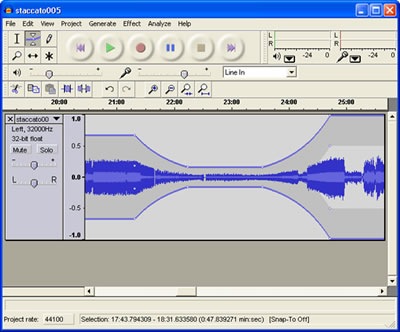
Having discussed a range of primary design and authoring tools, today's post will look at one of the key content development tools, an open source non-linear audio editor (NLE) called Audacity.

[It] is an easy-to-use audio recorder and editor for Windows, Mac OS X, GNU/Linux, and other operating systems .

(sourceforge.net)

Audacity has the capability to record live sound, convert analogue media sources, and manipulate audio. Its functions include:

  • Export to digital recordings like podcasts or CDs
  • Edit WAV, MP3, FLAC, and Ogg Vorbis sound files
  • Cut, copy, splice, and mix multiple audio files
  • Apply a range of digital signal processes including normalization, noise reduction, EQ, and compression

audacity audio editor

Figure 1 Audacity audio NLE

Audacity enables audio content may be exported in a wide range of formats, making it an exceptionally flexible tool for content developers. With a relatively shallow learning curve, the application can be used by non-experts after a few hours on instruction and use, while retaining the features found in proprietary NLEs like Steinberg WaveLab and Sony Sound Forge for media developers .

This level of functionality enables both SME and specialist content developers to take advantage of the features in the application in an Open Environment for E-Learning.

References:


Audacity website About Audacity [Internet] Available from: http://audacity.sourceforge.net/about Accessed 1 May 2008

--