The E-Learning Curve Blog has moved!

You will be automatically redirected to the new address in 10 seconds. If that does not occur for some reason, visit
http://michaelhanley.ie/elearningcurve/
and update your bookmarks.

Showing posts with label slideshare. Show all posts

Wednesday, December 17, 2008

SlideShare makes PowerPoint a little more Web 2.0-friendly

If you’re a regular (and dedicated) reader of The E-Learning Curve Blog, you’ll recall that in did a compare / contrast between authorSTREAM and SlideShare some months back. At the time I concluded:

So which service is better? Well, I guess that comes down to WIIFM - what's in it for me. The broad sweep of features and functionality are pretty similar on both services: deficiencies in one are accommodated by lack of functionality in the other, so it really comes down to personal choice.

My user experience of authorSTREAM was slightly superior to that of SlideShare: upload and conversion times were lower on the former service, for example. Equally, the enhanced slide animation and transition support on authorSTREAM was a positive advantage, as was the ability to view presentations in full-screen mode via a third party environment (my blog in this case). I also prefer the extended functionality afforded by the desktop-based client client, as well as the better audio integration.

In the end... well, I recommend that you try both out yourself, and you decide which service meets your needs.

Since then, both services have been nice enough to keep me up-to-date with developments in their respective apps. As you can imagine, most of these updates are incremental changes in slideshare_logo functionality, better app stability, and so on, but the latest update from SlideShare really excited me.

As an inveterate user of PowerPoint Add-ins (Camtasia, Presenter, PowerManual etc) I find the facility to generate e-learning content from within an authoring application to be an essential component of the Rapid E-Learning production process. As it happens, I’m presenting at an event tomorrow where my e-learning “wow factor” will be How to Create E-Learning Content in Four Mouse Clicks; and a PowerPoint add-in is an important part of that narrative.

You can now generate e-elearning objects in PowerPoint and publish them to the SlideShare website, using the new SS ribbon add-in. This looks like being a very cool tool indeed, and if I get all my shopping done, I’ll install and test over the next few days.

--

Friday, June 27, 2008

Online Presentation Tools as a Knowledge-Sharing Channel 4: assessment of authorStream and SlideShare

After yesterday's short digression into some of the finer points of heuristic evaluation, today I'm returning to the matter at hand: an assessment of the features and functionality provided by the authorSTREAM and SlideShare hosted presentation distribution services.

Now read on...

authorSTREAM is a web-based PowerPoint presentation sharing platform from authorGEN Technologies. After creating a presentation in Microsoft authorstream_logo PowerPoint, content creators can upload presentations to the authorSTREAM website. During the upload process the content is converted Adobe to Flash SWF format displayed via the Flash player. Content creators can use the provided HTML code to embed the presentation in a blog or website, as well to share the presentation via e-mail, and submit the content to YouTube. authorSTREAM also enables users to share their presentations via mobile devices that support MV4 playback such as the Apple iPod or iPhone.

Slideshare supports a range of import file types, including PowerPoint PPT, OpenOffice.org Impress, and PDF format. Broadly speaking, we can say that the SlideShare upload process shares many characteristics slideshare_logo with other Web 2.0 tools, and is in fact very similar to the authorSTREAM submission procedure. Generally speaking, once a file is uploaded and converted to SWF, it is publicly available.

The content creators can choose to make the slide show available to be downloaded. Interestingly for a service provided by a for-profit organization Slideshare is linked with Creative Commons, so various attribution licenses are supported (click here for more thoughts on Open Source Software). As with other hosted Web 2.0 services (including YouTube), a presentation can be viewed in the small screen or take the full screen of a monitor.

Table 1 authorSTREAM & SlideShare Feature Comparison

Feature

authorSTREAM

SlideShare

PowerPoint animations

Yes

No

PowerPoint animations with audio

Yes

No

Motion-based content (i.e. Flash animation / movies) in slides

Yes

No

Rehearsed timings

Yes

No

Voice-over narration

Yes

No

Embed code

Yes

Yes

Statistics

No

Yes

RSS Feed support

Yes

Yes

Full-screen playback

Yes

Via SlideShare.net only

Private content

Yes

Yes

PowerPoint file download

Yes

Yes

User Groups

No

Yes

General Observations: Content Authoring

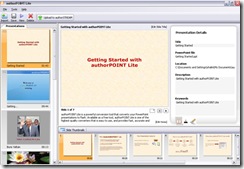
authorGEN provide authorPOINT Lite, an advanced multimedia presentation creation software utility, which installs in PowerPoint and offers a host of features for power users. Presenters can upload presentations directly from within PowerPoint with this add-on software.
authorpoint_lite_ss

authorPOINT is an advanced multimedia presentation creation software, which installs in PowerPoint as an add-in and provides a range of features for power users. Presenters can upload presentations directly from within PowerPoint with this utility. SlideShare does not offer any offline desktop utility to support the website service.

General Observations: Audio
authorSTREAM handles voice-over audio in presentations very well. Audio is retained in narrated PowerPoint presentations when uploaded to authorSTREAM. Authors can also create audio presentations using either live or pre-recorded audio as a media type via authorPOINT, before uploading to authorSTREAM.
SlideShare on the other hand, has a “slidecast” feature where the content author synchronizes a pre-recorded audio file online following upload to the server.

authorSTREAM's offline desktop application is a very flexible feature - potentially very useful for e-learning content, in my view.

General Observations: Content Distribution

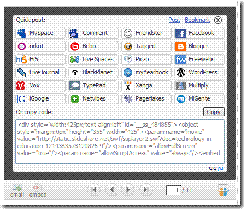
One very usable feature of SlideShare is it facility to enable extended distribution of content outside of it's native hosting environment. ss_embed_code By clicking on the <embed> button on the UI, both an author and any other user can either share the presentation via any one of a range of social networking services (see the screenshot for some examples) as well as provide the source code to enable the presentation to be embedded in a blog or web page, very similar to YouTube's functionality. A case could definitely be made that this type of portability will support the creation of Internet memes in environments where YouTube is not appropriate (due to bandwidth issues, for example).
Conclusions

So which service is better? Well, I guess that comes down to WIIFM - what's in it for me. The broad sweep of features and functionality are pretty similar on both services: deficiencies in one are accommodated by lack of functionality in the other, so it really comes down to personal choice.

My user experience of authorSTREAM was slightly superior to that of SlideShare: upload and conversion times were lower on the former service, for example. Equally, the enhanced slide animation and transition support on authorSTREAM was a positive advantage, as was the ability to view presentations in full-screen mode via a third party environment (my blog in this case). I also prefer the extended functionality afforded by the desktop-based client client, as well as the better audio integration.

In the end... well, I recommend that you try both out yourself, and you decide which service meets your needs.

--

Thursday, June 26, 2008

Online Presentation Tools as a Knowledge-Sharing Channel 3: heuristic principles in evaluation

Over the last couple of days I've been looking at the presentation-sharing channels authorSTREAM and SlideShare and how these two services enable the delivery of content via the Web. Both services rely on common read/write Web design and interaction patterns; like many other social sharing services, users are able to add tags, rate, comment, and embed content.

One of the nice things about assessing these two services is that it gives me a rare opportunity to discuss usability heuristics. According to Microsoft, the heuristic evaluation process is

a quick method to evaluate any user interface (UI) by using a list of heuristics or guidelines. Ideally, two or three people independently evaluate the UI using the heuristics so that the usability issues that each person finds can be compared. This evaluation technique can be used throughout the development process, from early screen shots to fully implemented code, but it is a good idea to run heuristic evaluations early in the development process so that the UI can be redesigned.

(Microsoft.com)

In this context, heuristics are "rules of thumb" or design principles used to evaluate the conformance of user interface (UI) features and functionality in computer applications. Probably the most well-known advocate of the heuristic evaluation approach is web usability consultant Jakob Nielsen.

Table 1 Nielsen's Heuristics

Heuristic

Description

Visibility of system status

The system should always keep users informed about what is going on, through appropriate feedback within reasonable time.

Match between system and the real world

The system should speak the users' language, with words, phrases and concepts familiar to the user, rather than system-oriented terms. Follow real-world conventions, making information appear in a natural and logical order.

User control and freedom

Users often choose system functions by mistake and will need a clearly marked "emergency exit" to leave the unwanted state without having to go through an extended dialogue. Support undo and redo.

Consistency and standards

Users should not have to wonder whether different words, situations, or actions mean the same thing. Follow platform conventions.

Error prevention

Even better than good error messages is a careful design which prevents a problem from occurring in the first place. Either eliminate error-prone conditions or check for them and present users with a confirmation option before they commit to the action.

Recognition rather than recall

Minimize the user's memory load by making objects, actions, and options visible. The user should not have to remember information from one part of the dialogue to another. Instructions for use of the system should be visible or easily retrievable whenever appropriate.

Flexibility and efficiency of use

Accelerators -- unseen by the novice user -- may often speed up the interaction for the expert user such that the system can cater to both inexperienced and experienced users. Allow users to tailor frequent actions.

Aesthetic and minimalist design

Dialogues should not contain information which is irrelevant or rarely needed. Every extra unit of information in a dialogue competes with the relevant units of information and diminishes their relative visibility.

Help users recognize, diagnose, and recover from errors

Error messages should be expressed in plain language (no codes), precisely indicate the problem, and constructively suggest a solution.

Help and documentation

Even though it is better if the system can be used without documentation, it may be necessary to provide help and documentation. Any such information should be easy to search, focused on the user's task, list concrete steps to be carried out, and not be too large.

So, what's in it for me as a learning professional?

In my view, the challenges of enabling learners to acquire new skills, knowledge and expertise is difficult enough, and anything that smoothes the path of this process should be implemented. The provision of a clear (maybe even formulaic) set of principles, rules, and guidelines at the design phase of an e-learning project, which should allow learners get comfortable with the learning environment should be a central tenet of every learning professional's design philosophy.

Oh. And as one of the rules for writing for the Web is

Be Succinct: write no more than 50% of the text you would have used in a hardcopy publication.

...and you, dear reader, have other things to do with your precious time.

I'm going to conclude today's post on this note, and return to authorSTREAM and SlideShare tomorrow.

___________________

References:

Microsoft Inc. (2008). Heuristic Evaluation Process. [Internet] Available from: http://www.microsoft.com/en-us/library/bb189150.aspx Accessed 20 June 2008.

Neilsen, J. (2005). Ten Usability Heuristics. [Internet] Available from: http://www.useit.com//papers/heuristic/heuristic_list.html Accessed 20 June 2008.

___________________

Links:

authorSTREAM.com

SlideShare.net

--

Wednesday, June 25, 2008

Online Presentation Tools as a Knowledge-Sharing Channel 2: SlideShare

Yesterday I started this short evaluation of web-based presentation sharing by going through the steps required to publish a presentation on authorSTREAM; today's presentation was generated and shared via the SlideShare hosting service.

Now read on...

Today's presentation, Technology in Education, is a draft version of something I'm working on so it's a little rough around the edges - it is OK for the objective of this test though.

--

This presentation will cover:

  • What is E-Learning?
  • Technology in Education (TIE)
  • Approaches to TIE
  • Benefits of TIE
  • Examples of TIE
  • Summary

Now that I've published content on both hosting services, tomorrow's post will establish the criteria for evaluation, and I'll write a little about my view on this method of content delivery.

Fógra: If you noticed that a there was a topic mentioned in the presentation objectives that wasn't covered in the body of yesterday's presentation on Rapid E-Learning Tools: well done.

There isn't a prize for noticing, but aren't you lucky you've been given the gift of good observation!

--

